Skip to content
  New year sale is live! →





Our invoices were late, our tasks scattered, and every tool we used came with a new login. For a small team, it felt like we were spending more time managing the complexity than actually doing the work.
However, that changed when we replaced five tools with one business management software. We ended the endless app-switching with just one clean setup that actually fits how we work.
So, inside, we’ll show you which platforms are worth your time, which ones aren’t, and how to choose the right one without wasting your budget.
Quick List of Top Business Management Software
- Agency Handy: Best for running your entire agency from client onboarding to final invoice.
- Hello Bonsai: Great for freelancers who want simple contracts, CRM, and billing
- Proofhub: Ideal for teams needing project visibility with Gantt and Kanban tools
- Zoho One: Good for growing businesses that want everything in one giant suite
- HoneyBook: Best for creatives who want clean workflows from inquiry to payment
- Ontraport: Ideal for automation-heavy businesses with complex customer journeys to map
A Quick Comparison of The Top Business Management Software Solutions
Here’s a side-by-side feature breakdown to help you quickly spot which business management tool matches your workflow best —
| Softwares | CRM | Task Management | Invoicing | Starting Price |
| Agency Handy | Full client tracking and billing | Visual Kanban board with assignees | Recurring, multi-currency, PayPal/Stripe | $19/month |
| Hello Bonsai | Client profiles with tags and notes | Task dashboard with deadlines | Auto billing, ACH and card support | $15/user/month |
| Proofhub | Basic contact management | Gantt, Kanban, custom workflows | Manual via integrations | $50/month |
| Zoho One | Advanced CRM with lead scoring | Gantt, milestones, complete coordination | Tax-ready, recurring, multi-currency | $45/user |
| HoneyBook | Pipeline with lead forms | Timeline with automation tools | Contracts, reminders, ACH and card billing | $36/month |
| Ontraport | Custom records with segmentation | Task steps inside workflows | Subscriptions, order forms, automation | $24/month |
6 All-In-One Business Management Software for Teams
To help you find the right fit, we got hands-on with over a dozen platforms used by real agencies, creative teams, and service providers. We tested how each one handles everyday work like managing clients, sending invoices, tracking tasks, and keeping files in one place.
So, here’s the business management software list that will bring something valuable to your table.
1. Agency Handy
If you’re constantly dealing with scattered updates, late invoices, or chaotic client handoffs, Agency Handy can help you manage everything in one place.
You can run your entire operation, from first lead to final payment, without switching between five different platforms. In addition, you can launch a branded client portal with your logo and custom domain in minutes.
And when a client places an order, the system automatically generates an invoice. Then, it links the invoice to their profile and adds tasks to your visual Kanban board so your team can jump right in.
Plus, time tracking is built directly into each task, so logging billable hours stays clear and organized. The lead pipeline is equally sharp to track progress from New to Qualified to Proposal Sent to Client. So, it’s easy to see exactly where things stand at a glance.
If you offer recurring services or subscriptions, the billing tools handle that too. From taxes, reminders, and multi-currency support, Agency Handy handles them all. Most importantly, clients can leave feedback directly on files, submit support tickets.
They can even request add-on services through the portal, with a proper approval flow in place. Plus, you can also embed external tools like Google Drive, Figma, and YouTube to keep everything centralized and accessible.
Everything connects back to the client record: CRM, tasks, invoices, feedback, and reporting. So, no loose ends.
Features of Agency Handy
Agency Handy isn’t just packed with tools—it’s built to handle real problems agencies face every day. From client onboarding to billing, everything’s tied together in a way that’s simple to use, easy to manage, and saves serious time.
White-Label Customization

Agency Handy gives you full control to brand the platform as your own. You can upload your logo, apply your color palette, and even set a custom domain, so clients always see your agency.
Plus, emails, invoices, and proposals also follow your branding automatically. It’s all included in the base plan, so you can look professional from day one without paying extra.
Order and Task Management
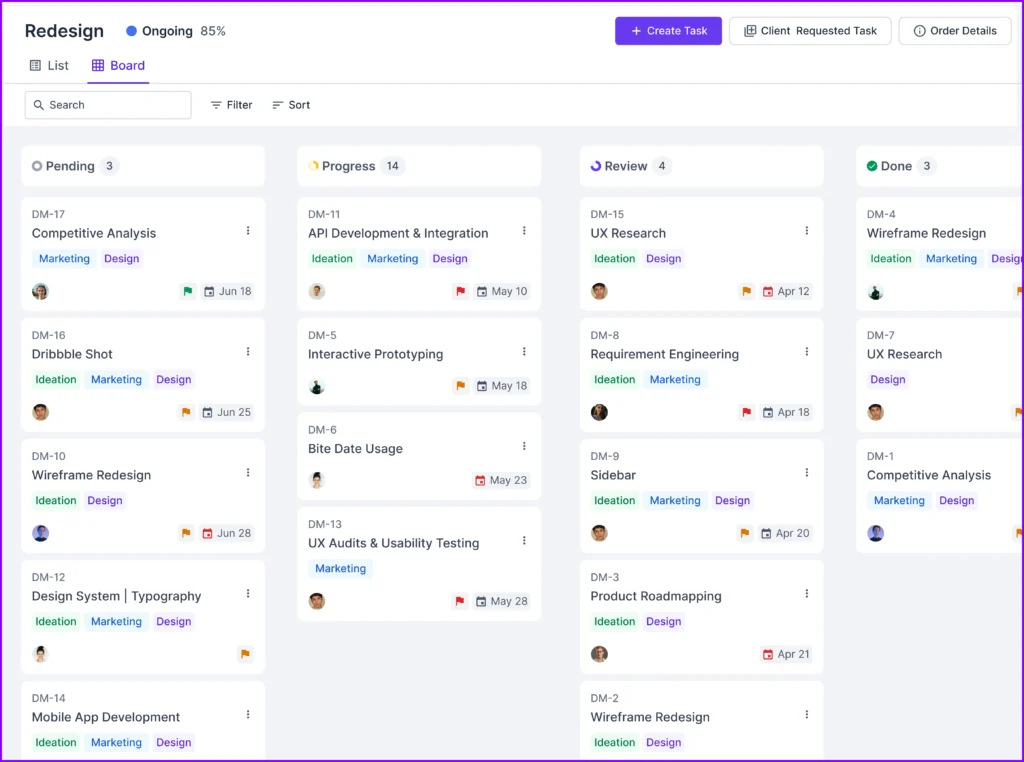
Every time a client places an order, Agency Handy creates a structured workflow around it. You can break big jobs into smaller tasks, assign them to team members, set deadlines, and track progress in real time using a Kanban-style board.
This visual setup keeps your projects organized and moving, without needing extra tools or micromanagement.
Service Catalog
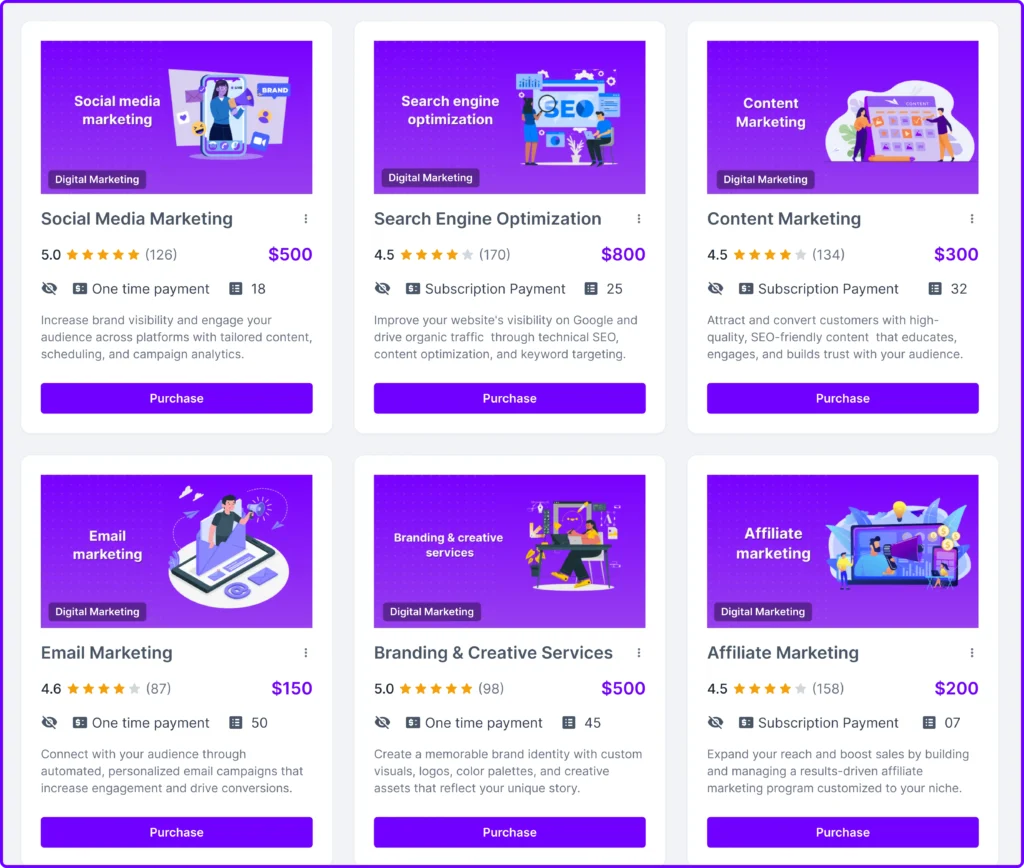
Agency Handy gives you a smart way to organize your services. You can build a full catalog with clear descriptions, set prices, and offer multiple packages. If you want to give them a trial option, that’s built in too.
You can also group similar services together to make things easier to explore. And when you’re ready to share, just send a direct link through email,chat, or embed the catalog right on your site if that fits your flow better.
Built-in CRM
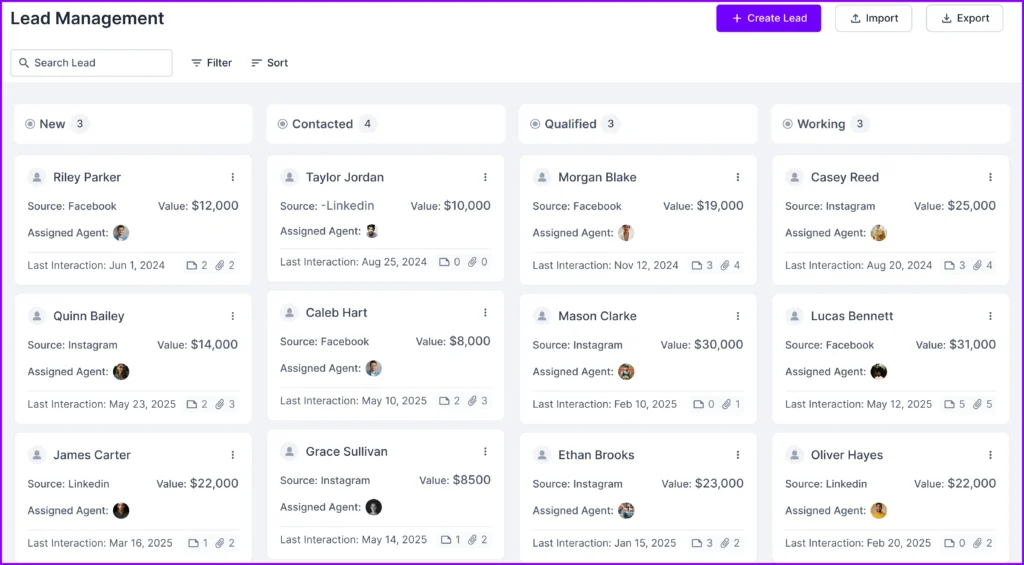
With Agency Handy’s CRM, you can manage the full client journey in one place. From lead capture to proposal, onboarding, and project delivery, everything stays tied to a single, searchable profile.
Plus, contact history, billing info, support tickets, and even file uploads are all stored together. It keeps your team in sync and your client experience seamless.
Real-Time Collaboration

Shared task lists, built-in file sharing, and on-platform comments make team and client collaboration easy. Clients can review work, leave feedback, and approve tasks without switching tabs or tools.
Internally, your team can coordinate projects without jumping between Slack, email, and spreadsheets. It’s all designed to reduce back-and-forth and keep momentum strong.
File Feedback System
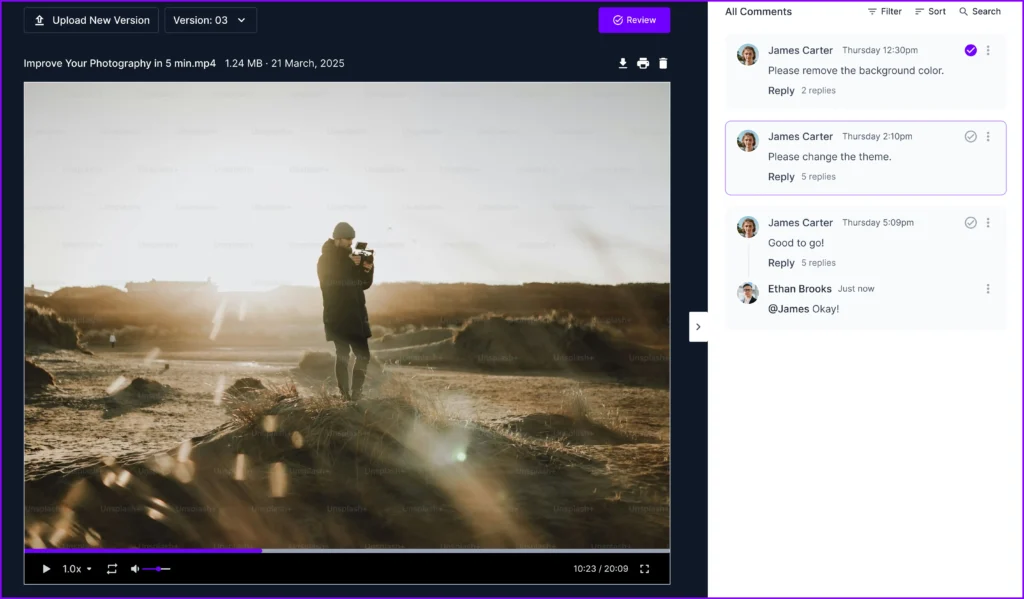
Instead of complicated email threads, Agency Handy lets you upload designs, videos, and documents directly to a project. Meanwhile, clients can leave feedback right on the file, highlighting sections, drawing, or commenting.
You can also upload new versions and keep track of what’s changed. This creates a clear, organized trail of revisions.
Time Tracking

You can track work as it happens with a built-in timer, or log hours manually if needed. Time entries stay linked to tasks and projects, and each entry can include notes for extra context.
Managers can review detailed timesheets by person, project, or service to spot where hours go and how timelines evolve.
Automated Invoicing and Billing
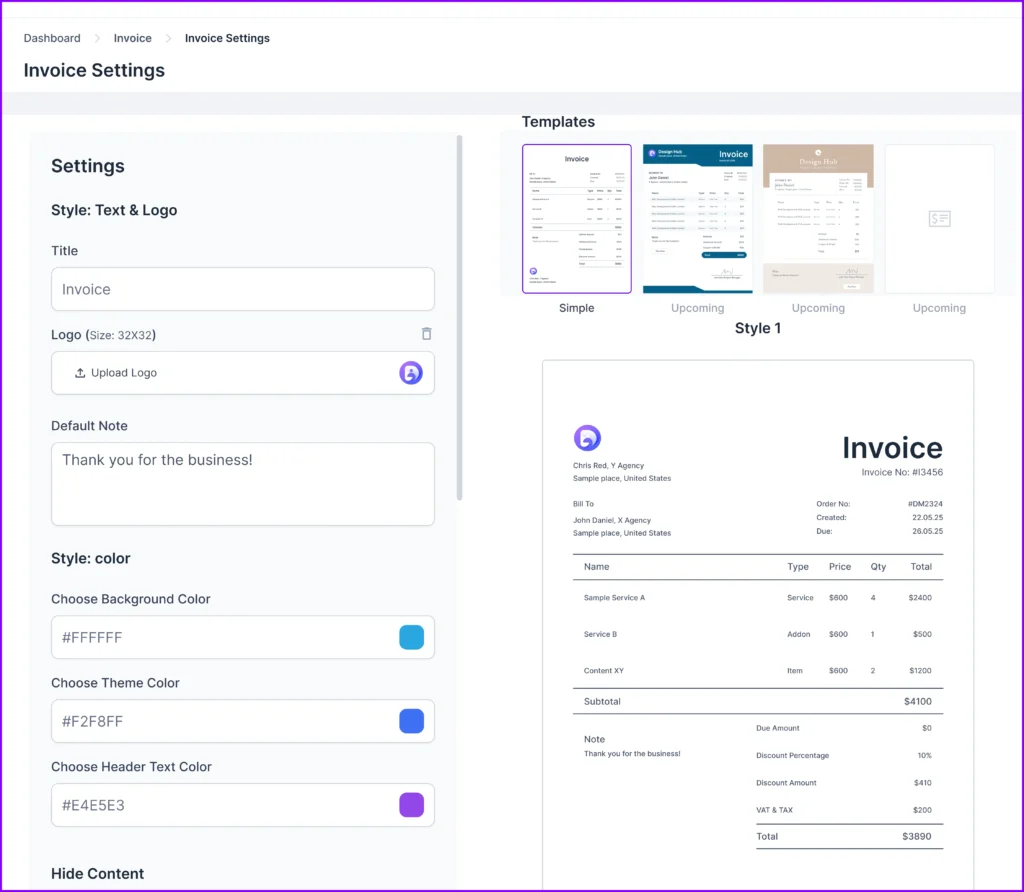
Agency Handy generates invoices as soon as an order is placed. You can choose one-time or recurring billing, apply discounts or taxes, and add multiple payment methods like Stripe, PayPal, Wise, or bank transfer.
Moreover, automated reminders help you get paid on time, while everything stays tied to the right client and project.
Custom Forms and Order Flow
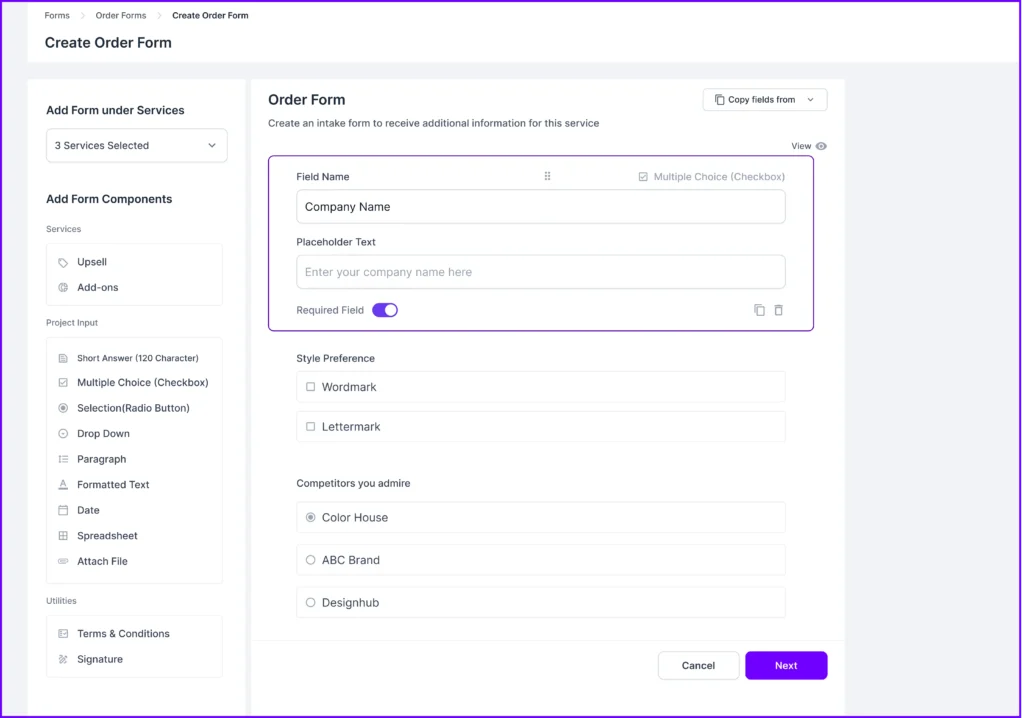
You can build intake and order forms to collect project goals, budgets, deadlines, and add-ons right from the start. When a client fills out a form, a full order profile is created automatically, keeping everything organized from the jump.
It helps you avoid endless follow-ups and makes your onboarding smoother and faster.
Built-in Ticketing System

Clients can raise support tickets from inside their dashboard. You can assign those tickets to the right person, set a priority, and add a deadline. Each ticket logs a full conversation history, so there’s no need to dig through inboxes.
It’s a structured way to handle support that stays within your platform.
Embeds for External Tools
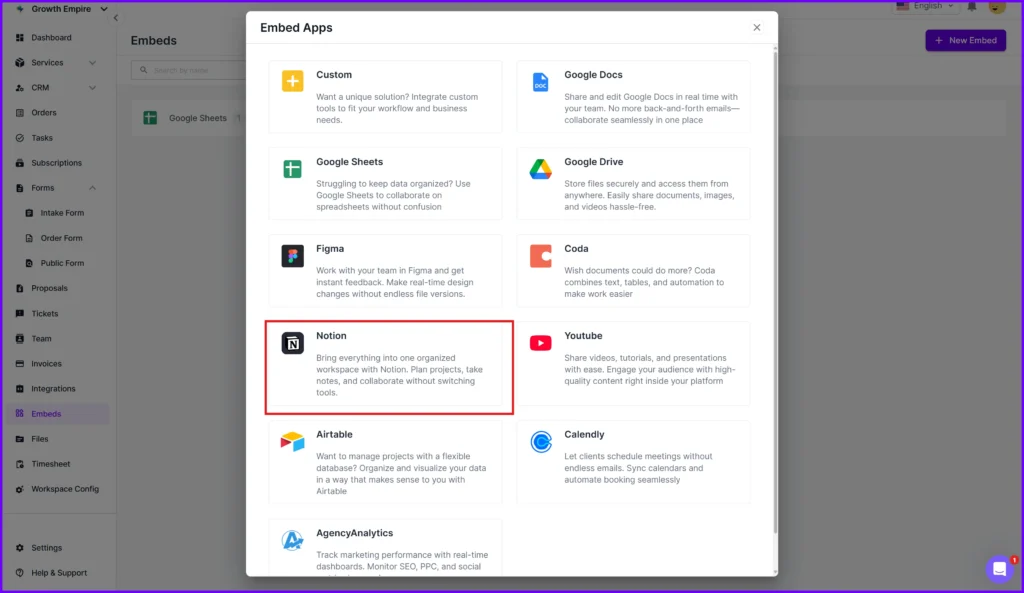
Instead of switching between apps, you can embed content directly into your workspace from Google Drive folders and YouTube videos to Figma files and client docs. These embeds can be made visible to your team, specific clients, or both.
That way, the tools and resources you already use stay right where the work happens.
Role-Based Access & Security
Agency Handy lets you control who sees what. You can assign roles like Admin, Manager, or Assignee, with each role having different levels of access. It keeps sensitive client data safe while giving your team the tools they need to do their jobs.
Agency Handy Pricing

Pros
- All-in-one platform replaces 5+ tools at once
- Flat pricing with no surprise user-based fees
- White-label setup boosts your agency’s brand image
- CRM, invoicing, and tasks are fully integrated in one place
- Built-in client portal improves collaboration and trust
- Automations cut down on manual tasks and follow-ups
- Easy onboarding with zero-code setup and templates
What Users Say About Agency Handy?
Review on G2: 4.9 out of 5
“I really like how Agency Handy keeps everything in one place—it makes managing tasks and tracking team hours super easy.” – Sheena S.
Review on Trustpilot: 4 out of 5
“One of the key features I love about Agency Handy is its incredible ability to keep all client data organized.” – Michael Pitts BossupGR
Review on Producthunt: 5 out of 5
“A great tool for agency management. AgencyHandy solves all my managemnt problems easily. A hassle free tool you should add to your list.” – Shamima Nasrin
Why Use Agency Handy Business Management Software?
Here’s how Agency Handy stacks up against what businesses need in a modern management tool —
| Business Management Software Requirement | How Agency Handy Delivers It |
| Client Management | CRM tracks the full client journey. |
| Order Handling | Service orders auto-generate tasks, timelines, and team assignments. |
| Task Management | Visual Kanban, priorities, deadlines. |
| Time Tracking | Built-in timers, manual entries, logs grouped in timesheets. |
| Collaboration | Clients and team share tasks, comments, and files. |
| Support Ticketing | Clients raise tickets; you assign, resolve, and track with history logs. |
| Invoicing & Payments | Auto or manual invoices with Stripe, Wise, and custom payment options. |
| Subscription Billing | Handles recurring plans, automated renewal reminders, and tax logic. |
| Custom Branding | Logo, color, email, and domain control, even in the basic plan. |
| Role-Based Access | Super Admin to Assignee: each user gets only what they need. |
| Analytics | Dashboard shows revenue, client activity, open tasks, and ticket volume. |
| Lead Pipeline | Visual status stages from ‘New’ to ‘Client’ with values + last contact. |
| Secure File Sharing & Feedback | Clients comment directly on PDFs, images, and videos. |
| Custom Forms | Collect project goals, service picks, and deadlines. |
2. Hello Bonsai
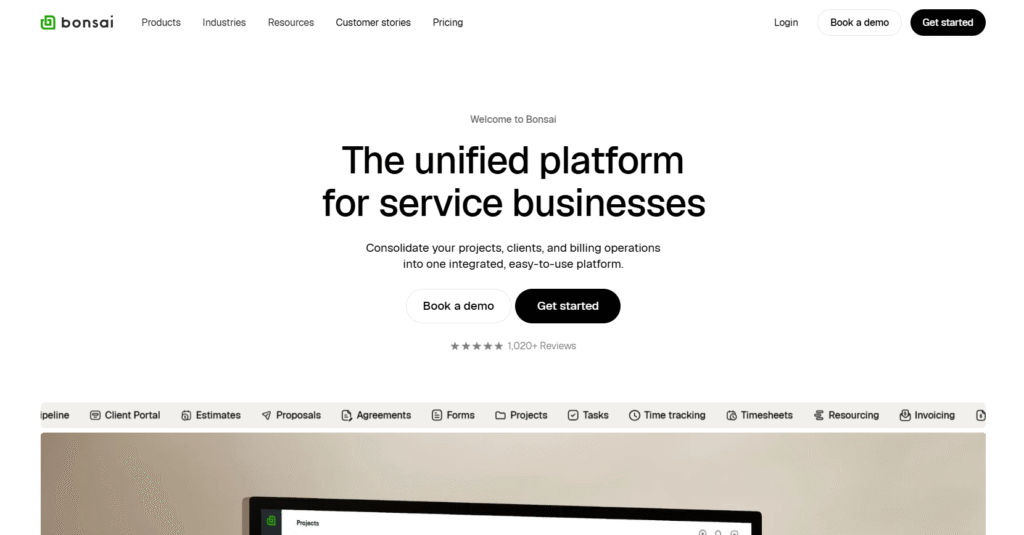
If you’re running a lean agency and tired of switching between tools for proposals, contracts, invoicing, and taxes, we’d say Hello Bonsai makes sense. It’s best when you want a unified system that handles client operations and financials without layering five platforms together.
We’ve used Bonsai to manage CRM data, send out branded proposals, collect digital signatures, and automate our recurring invoices. Its built-in banking and bookkeeping features are especially helpful.
Plus, you can track expenses, forecast taxes using the Profit First model, and get a real-time view of income versus outflows. Plus, their sales pipeline tools (with Kanban-style tracking) help you stay on top of leads and deals without losing visibility.
Now, we won’t pretend it’s flawless. Several users online complain about bugs and flaky support. One Redditor, Immediate-Smell-4217 mentioned, “I kept experiencing bugs with linking my account to Stripe… support had no idea what was going on.” Payment holds and unexpected account reviews have also been flagged.
Still, if your workflow fits their feature set, it might simplify your back office more than you expect.
Features of Hello Bonsai
Here’s a breakdown of its core business management features —
- Client CRM: Manage contact details, notes, files, and tags for each client in a centralized, organized database.
- Contract Templates: Generate legally sound contracts, reuse templates, and collect digital signatures directly through the platform.
- Sales Pipeline: Track leads, customize pipeline stages, and forecast deal values with integrated CRM and project links.
- Client Portal: Give clients a secure space to view invoices, contracts, shared files, and task updates in real time.
- Project Management: Assign tasks, set deadlines, track deliverables, and manage team workload from a single dashboard.
- Time Tracking: Log hours for billable work, monitor team capacity, and link time entries to specific tasks or clients.
- Invoicing: Send one-time or recurring invoices, track payments, add taxes, and get notified when clients view or pay.
- Payments: Accept credit cards and ACH payments, automate billing, and manage subscription payments without third-party tools.
- Tax Estimates: Auto-calculate state and federal taxes owed based on income and expenses.
- Forms & Scheduling: Build intake forms and set client appointments with a built-in scheduling tool similar to Calendly.
- Reports & Insights: Generate real-time views of profit, budget, utilization, and project health to support better decision-making.
- Resource Planning: Assign project hours based on availability, manage time-off requests, and balance team capacity with drag-and-drop tools.
Hello Bonsai Pricing
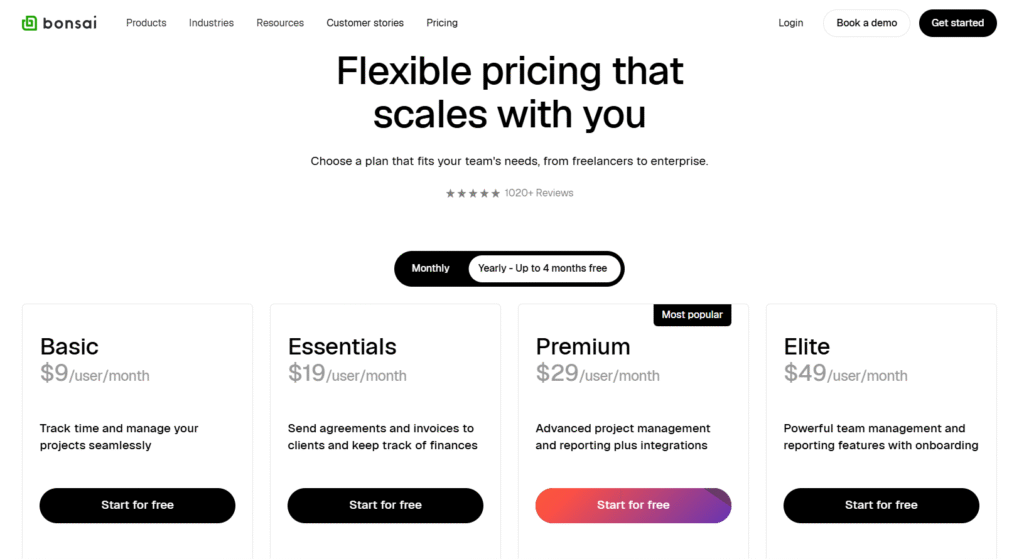
Hello Bonsai offers four flexible plans designed for freelancers, small businesses, and growing teams.
- Basic: $15 per user/month (monthly billing) or $9 per user/month (monthly billing)
- Essentials: $25 per user/month or $19 per user/month (monthly billing)
- Premium: $39 per user/month or $29 per user/month (monthly billing)
- Elite: $59 per user/month or $49 per user/month (monthly billing).
Every plan comes with a free trial, and no card is needed. You can also save up to 4 months with annual billing.
Pros
- All-in-one dashboard keeps client work organized
- Easy proposal and invoice tools save time
- Clean interface makes navigation simple for beginners
- Fast contract signing speeds up onboarding
- Built-in CRM reduces need for extra software
- Automated reminders improve payment collection
Cons
- No access to advanced automation tools
- ACH payouts can take too long
What Users Say About Hello Bonsai?
Review on G2: 4.2 out of 5
“I like the user friendly on both sides, the backend and the client.” – Jenn M.
Review on Trustpilot: 4.3 out of 5
“The interface is so easy to use and makes keeping track of my contracts, invoices, and task lists a breeze.” – Auden Winter
3. Proofhub

Proofhub is a solid pick when you’re looking for structure, visibility, and built-in collaboration. You can use it to plan work, set up tasks with custom workflows, and keep projects on track using Gantt charts and Kanban boards.
Also, it allows you to assign roles, track time, and manage workload views all from one dashboard. That makes it easier for you to stay in control without micromanaging. Plus, Proofhub integrates in-app chat, threaded discussions, shared notes, and file proofing.
Plus, everything from files, forms, to task comments, stays inside the platform, which really helps keep everyone aligned. That said, it’s not perfect. There’s no native budgeting tool, and automation is limited.
As RAHUL J. from G2 summed it up well: “No budgeting option available, and time management in projects is a little bit tricky.” Still, if you just want your team to stay on track inside a single system, ProofHub makes that happen.
Features of Proofhub
Here’s a breakdown of its most valuable features for business management —
- Task Management: Create and assign tasks with deadlines, priorities, labels, and attachments.
- Time Tracking: Log hours manually or with timers to track productivity, calculate billable time, or review team workload.
- Gantt Charts: Visualize task timelines, set dependencies, add milestones, and compare progress with planned baselines in real time.
- Kanban Boards: Manage tasks through custom stages, offering a drag-and-drop interface to reflect progress and identify blockers.
- Project Reporting: Generate detailed reports on time logs, task status, team activity, and project progress to improve decision-making.
- Team Collaboration: Share updates, comment on tasks, and hold threaded discussions in one place to streamline communication.
- File Management: Upload, store, organize, and share files within projects, with version control and cloud integration options.
- Custom Roles & Permissions: Set access levels and define responsibilities to maintain control over what team members can view or edit.
- Built-in Forms: Collect client requests, internal inputs, or tickets directly into your workspace using customizable request forms.
- Notes & Documentation: Create internal wikis, meeting notes, or SOPs collaboratively to keep important reference materials easily accessible.
- Project Templates: Build reusable project setups with pre-defined tasks, milestones, and workflows to speed up new launches.
- Calendar Management: Plan events, deadlines, and milestones with a shared calendar to align schedules across the team.
- In-app Chat: Message teammates directly inside the platform without switching tools or relying on external apps.
- Integrations: Connect with tools like Google Drive, Dropbox, OneDrive, and QuickBooks for extended document and accounting functionality.
Proofhub Pricing

Proofhub kept it simple, just two plans, flat-rate, no surprise fees per user. You get unlimited users on both tiers, so your costs won’t balloon as your team grows. And yes, there’s a free trial too.
- Essential: $50/month (billed monthly) or $45/month (billed annually).
- Ultimate Control: $99/month (billed monthly) or $89/month (billed annually for the first 3 months, then $135)
Pros
- Fixed pricing with unlimited users saves serious money
- Combines multiple tools into one shared workspace
- Offers strong task visibility with Gantt and Kanban views
- Simplifies communication with built-in chat and discussions
- Custom roles and permissions keep teams organized
Cons
- Limited third-party integrations for marketing or CRM needs
- Automation capabilities are still fairly basic
What Users Say About Proofhub?
Review on G2: 4.6 out of 5
“ProofHub brings the team’s daily tasks together on the same page, making the workflow clear to everyone.” – Zein Q.
Review on Capterra: 4.5 out of 5
“Hard to use on a phone with the app, works better on computer.” – Ben W.
4. Zoho One

We’ve found Zoho One to be a solid small business management software, if you want to keep everything in one ecosystem. It’s especially useful when you’ve got someone on the team who can manage setups, integrations, and the occasional workaround.
You’ll get access to a wide suite of apps, like CRM, project management, invoicing, marketing automation, and inventory. Plus, Zia, their AI assistant, helps with lead scoring, automation, and pulling up records quickly.
Admin tools like SSO, permission settings, and custom dashboards make it easier for team leads to stay on top of access and visibility. And if you’re building out internal tools or workflows, Zoho’s low-code platform gives you the flexibility to shape things the way you need.
Still, it’s not perfect. Some users complain about the clunky UI and bugs in certain modules. As Material_Wonder5651 bluntly put it, “Every Zoho app was developed at a different time, by a different team.” On the upside, Acceptable-Bend-5213 said, “It’s A LOT cheaper and the built-in features really let you do some cool things.”
Features of Zoho One
Here is a clear and concise list of its Zoho One’s key features —
- Unified Dashboard Interface: Manage your entire business from one place using customizable dashboards and seamless app-switching without losing context.
- CRM & Sales Automation: Capture, track, and convert leads into customers using contextual data and automated follow-ups across multiple touchpoints.
- Finance Management: Track income, expenses, taxes, and invoices with Zoho Books and Invoice, all integrated for streamlined accounting.
- Marketing Automation: Build multichannel campaigns, score leads, and personalize outreach to convert prospects into sales-ready leads.
- Project & Task Management: Plan tasks, set milestones, and use Gantt charts or Kanban views to manage team productivity and deadlines.
- AI Assistant (Zia): Generate insights, automate workflows, and assist with tasks like grammar checks, sales predictions, and translation.
- Internal Messaging & Collaboration: Chat in real time, share group notes, and use team inboxes to centralize work communication.
- Customer Support Tools: Respond to queries, manage tickets, and support customers through Zoho Desk with automation and SLA tracking.
- Billing & Subscription Management: Generate invoices, manage recurring billing, and handle multi-currency payments with tax compliance.
- Analytics & Reporting: Generate business intelligence dashboards to analyze sales, churn, revenue, and customer behavior in real time.
- Email & Communication Tools: Use Zoho Mail and PhoneBridge for professional email, VoIP integration, and centralized communication records.
- SSO & Access Control: Assign app access, manage roles, and ensure secure logins across all users with centralized permission control.
- Third-Party App Integration: Connect with popular tools or extend functionality through open APIs, webhooks, and prebuilt integrations.
Zoho One Pricing

Zoho One comes with two simple plans, depending on how many people you need to onboard.
- All Employee Plan (best for full teams): $45 per employee/month (monthly) or $37 (yearly).
- Flexible User Plan (great for smaller setups): $105 per user/month (monthly) or $90 (yearly).
You can try everything free for 30 days, and yes, no credit card needed. Just sign up and start exploring.
Pros
- Wide range of tools included in one subscription
- Flexible enough to support multiple departments and roles
- Strong automation and customization capabilities
- Seamless integration across core Zoho apps
- Scales easily with growing small and mid-sized businesses
Cons
- Steep learning curve due to many interconnected tools
- User interface can feel outdated or inconsistent
What Users Say About Zoho One?
Review on G2: 4.4 out of 5
“Interface is clean. Customizability options are above average in both usability and functionality for anything customer service related.” – Jesse C.
Review on Capterra: 4.2 out of 5
“The CRM interface is very easy to use and is simple to teach our sales team. It also allows us to take plenty of notes and include all the information we need in each account.” – Gregory M.
5. Honeybook
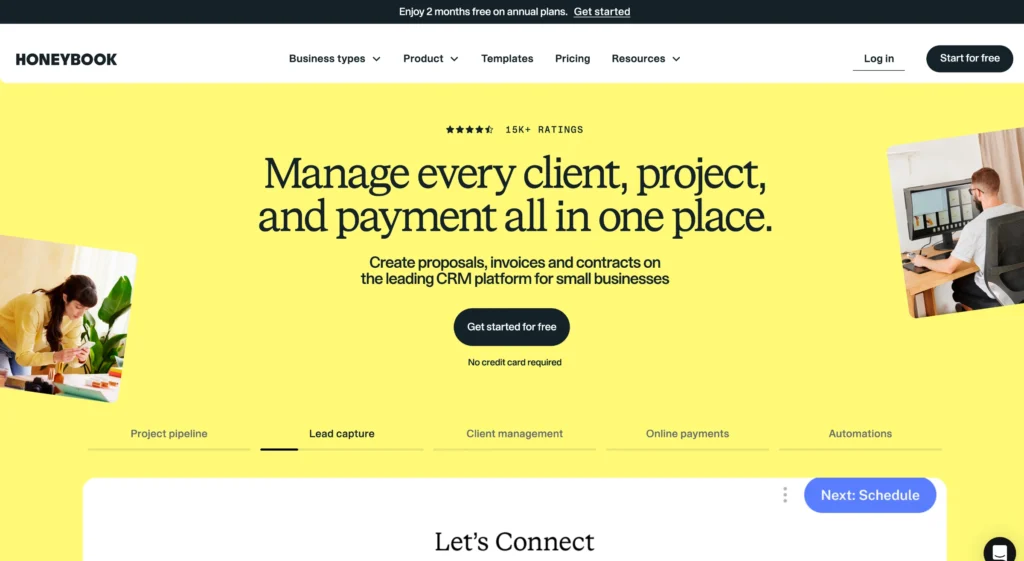
If you want a clean client workflow where clients, contracts, and payments don’t get mixed up, HoneyBook is a great option.
This business management software for small businesses connects your sales process together, from first inquiry to final payment. You can send out branded proposals, get contracts signed, book meetings, and trigger automated emails from the same place.
It even handles invoices and e-signatures, so your pipeline doesn’t get stuck waiting on paperwork. There’s a client portal, too! Thus, your clients can check timelines, pay bills, or sign docs without chasing you down.
And if you use QuickBooks, Calendly, or Zapier, it integrates nicely with those. As one Redditor, minfelise put it: “I just started using HoneyBook and so far I am liking it… especially the scheduling feature that replaces Calendly.”
That said, we found their support system is pretty weak. RhythmEarth pointed it out perfectly: “Every time I talk to them, I feel like I’m teaching them how to use the product.” Another added: “Can’t stand it… more problems than not.”
Features of Honeybook
HoneyBook brings important tools into one platform so you can run your business smoothly from the first inquiry to the final payment.
- Client Booking Automation: Let clients book services, sign contracts, and pay invoices.
- Proposal & Contract Builder: Create branded proposals, contracts, and invoices bundled together for quick approval and easy client onboarding.
- Online Payments: Accept credit cards and ACH payments directly through HoneyBook with automatic payment reminders and tracking.
- Lead & Inquiry Management: Capture inquiries from your site or social media and track each lead’s progress through a custom pipeline.
- Scheduling Tool: Let clients schedule meetings or sessions based on your real-time availability.
- Custom Workflows: Build automation rules to send emails, trigger tasks, and move projects forward without manual follow-up.
- Templates Library: Use prebuilt templates for emails, invoices, contracts, and proposals to save time and stay consistent.
- Client Portal: Give each client access to a branded space where they can view files, messages, and invoices in one place.
- Time & Expense Tracking: Log hours and expenses for projects so you can stay on budget and invoice accurately.
- Mobile App Access: Manage clients, messages, payments, and projects on the go with a full-featured mobile app.
Honeybook Pricing
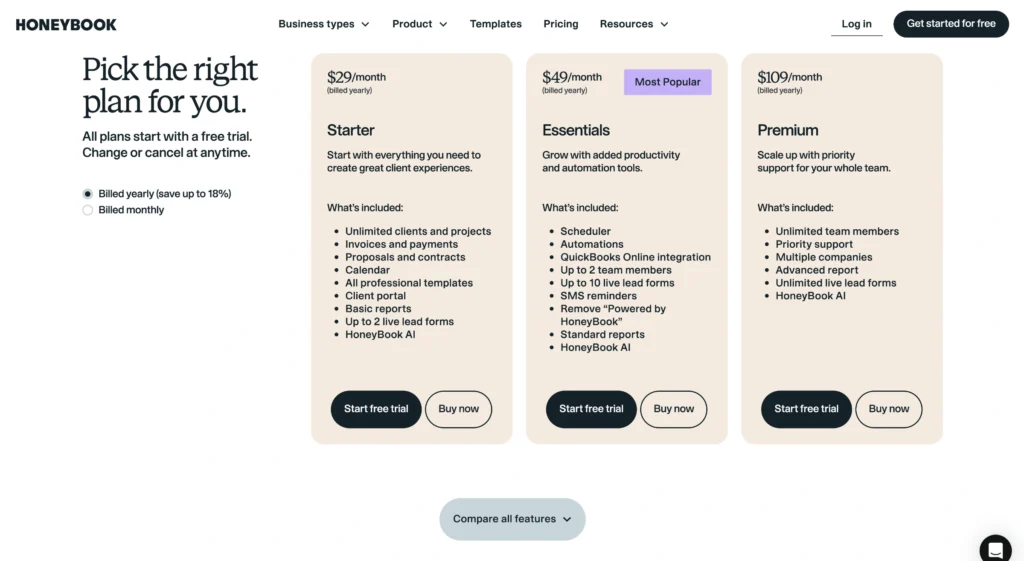
If you’re eyeing HoneyBook, the pricing’s pretty straightforward, and we’ve seen how it plays out in real setups.
- Starter: $36/month or $29/month billed annually.
- Essentials (Most popular): $59/month or $49/month billed annually.
- Premium: $129/month or $109/month billed annually.
And yes, there is a 7-day free trial, no card needed.
Pros
- Automations save time and prevent missed follow-ups
- Professional branding across proposals, invoices, and emails
- Great for freelancers and service-based small businesses
- Responsive support team and active product updates
- Easy to onboard and use without technical skills
Cons
- Client collaboration features are currently limited
- Reporting tools need better in-app usability and depth
What Users Say About Honeybook?
Review on G2: 4.5 out of 5
“I like that I can access pretty much all that I need in one place. Its taken my business up a notch professionally as well.” – Winnie T.
Review on Capterra: 4.7 out of 5
“Recurring invoice generation is not as flexible as they have to be.” – BURGOS S.
6. Ontraport

Let’s say your agency’s jumping between too many tools, like manual spreadsheets here, and random plug-ins there, which is slowing you down! Ontraport steps in as a full-stack system built for agencies that live and breathe automation.
Well, it’s a strong fit if you’re ready to spend a bit of time upfront getting everything connected. Now, what really sets Ontraport apart is the visual automation builder. You can map out entire workflows, trigger actions based on client behavior, and use dynamic tags to keep things organized.
With custom CRM records, embeddable forms, and membership tools, you can capture leads, track interactions, and handle recurring payments. It also helps with internal processes like task tracking and deal management.
You get reporting dashboards that let you follow what’s working and where leads are dropping off, without needing a separate analytics tool.
That said, it’s not perfect. Our team had a tough time getting familiar with it, and the UI takes some getting used to. It’s also missing team collaboration features like kanban boards.
Features of Ontraport
The following are Ontraport’s standout features designed for business workflow efficiency —
- CRM and Contact Management: Manage leads, customers, and partners in one centralized CRM with detailed activity tracking and customizable data fields.
- Marketing Automation: Build automated campaigns that send emails, trigger actions, and guide prospects based on behavior and segmentation rules.
- Sales Pipeline Management: Track deals through customizable sales stages to manage follow-ups, close rates, and team performance at a glance.
- Email Marketing: Send personalized emails at scale using templates, dynamic content, and performance tracking to optimize open and click rates.
- Payment Processing and Orders: Generate and process orders, subscriptions, and one-time purchases with integrated payment gateways and billing automation.
- Form Builder: Create forms that capture leads, update contact records, and trigger automations directly from your website or landing pages.
- Business Process Automation: Automate internal workflows like task assignments, customer onboarding, and recurring reminders across teams and departments.
- Task and Project Tracking: Assign, track, and complete tasks within the platform to ensure accountability and team alignment on goals and deadlines.
- Reporting and Insights: Generate visual dashboards and detailed reports to monitor marketing performance, sales conversion, and operational metrics.
- Integrations and API Access: Connect to tools like QuickBooks, Google Workspace, and Zapier or build custom integrations via Ontraport’s open API.
Ontraport Pricing

Ontraport offers four flexible plans tailored to different stages of business growth.
- Basic: $24/month (billed monthly).
- Plus: $83/month (billed monthly).
- Pro (Most popular): $124/month (billed monthly).
- Enterprise: Starts at $249/month.
Moreover, a 14-day free trial is available, no credit card required. Plus, a 30-day money-back guarantee ensures risk-free setup.
Pros
- Strong automation tools simplify repetitive manual tasks
- Centralized data helps improve customer experience
- Flexible CRM supports advanced segmentation and targeting
- Visual builders make campaign setup more intuitive
- Integrates well with major tools and platforms
Cons
- Pricing may be high for small businesses
- Learning curve can slow early adoption
What Users Say About Ontraport?
Review on G2: 4.5 out of 5
“Amazing support, several great options for landing pages and a ton of information about how to get things right.” – Susan A. L.
Review on Capterra: 4.2 out of 5
“The email management and sales recording data are very helpful and critical to my business.” – Aaron Z.
What are the Types of Business Management Software Solutions?

Now, we’ll walk you through different types of business management tools built to help you with more clarity and less chaos.
CRM
Customer Relationship Management (CRM) software lets you keep track of every lead, conversation, and deal. It’s especially useful in sales and marketing as it helps your team to stay organized and build better customer relationships.
Accounting
Accounting software helps you stay on top of finances by tracking income, expenses, purchase orders, and inventory. Meanwhile, it also generates clear reports like balance sheets, profit and loss, and cash flow summaries.
HR
HR software keeps your employee records, schedules, payroll, and benefits all in one place. Whether you’re managing full-time staff or contractors, it makes people operations easier to handle and less scattered.
Marketing and Sales
Marketing and sales tools automate the busywork, like lead capture, email follow-ups, and social media posts. Thus, your team can focus on moving prospects through the pipeline and hit goals with better insights.
Content Management
A Content Management System (CMS) gives you one secure spot to store and manage internal files like contracts, reports, and HR documents. It makes accessing, sharing, and backing up business documents fast and reliable.
Project Management
Project management software helps your team stay on track by assigning tasks, managing deadlines, sending alerts, and logging time. It keeps projects from slipping through the cracks and gives everyone a clear next step.
Key Features to Consider When Looking for Business Management Software (BMS)

We’ve tested enough software to know that if the core features aren’t right, the rest won’t matter. Here’s what your BMS absolutely needs to make everyday work easier, cleaner, and more connected.
Cloud-Based Technology
A cloud-based BMS lets your team log in from any device, sync updates in real time, and keep things moving even if they’re offsite. You won’t need heavy IT infrastructure, and scaling becomes way less painful.
Everything stays secure, backed up, and easy to reach.
Task Tracking and Project Oversight
When you can’t see what’s moving, you lose control. Your BMS should make it easy to assign work, set due dates, and check status without chasing updates.
Here, tools like Kanban boards and Gantt charts help your team see priorities at a glance. Whether it’s a client project or internal ops, you’ll know what’s on track and what’s not without asking twice.
Invoicing and Payment Handling
Your BMS should let you create invoices, send them out, and track payments—all from the same place you manage your work. Recurring billing, tax settings, and reminders should be built in. It keeps your cash flow predictable and reduces friction with clients who just want a clear, easy way to pay.
Collaboration Tools
The best business management software keeps chats, files, and feedback in one spot. That means fewer Slack pings, fewer lost updates, and more clarity.
Whether it’s tagging teammates, sharing notes, or reviewing comments, you want a system where your team can work together without switching tabs.
Customization Options
Every team works a little differently. That’s why your BMS should let you adjust what matters, like custom workflows, dashboards, and form fields. You should be able to shape the tool around how your team already operates
And when things change, your setup should be easy to tweak without calling support.
User-Friendly Interface
If your team struggles to use the platform, it doesn’t matter how useful it is. Your BMS needs to feel simple with clear menus, drag-and-drop tools, and customizable views.
There should not be any steep learning curve. The easier it is to use, the faster your team adopts it.
Integration with Existing Tools
You’re already using tools like your CRM, accounting software, and time trackers. Your BMS should integrate with those systems cleanly. So, look for built-in integrations or open APIs that let your data move freely between apps.
When everything connects, you cut out repeat work and get better visibility across your operations.
How Can You Select and Implement Business Management Software

Choosing the right business software is about solving real problems. So, let’s walk you through each step so you can make a smart, confident decision without wasting time or money.
Identify the Problems You’re Trying to Fix
We begin by asking, what’s slowing us down? Maybe it’s lost leads, overdue invoices, or messy team handoffs. Don’t rush into tools until you’re clear on what you’re solving.
Write down your daily frustrations as these become your must-haves. Skipping this step often leads to buying software jam-packed with features you’ll never use.
Set a Realistic Budget
Your budget is your boundary. See, software can cost $20/month or $2,000/month, depending on what it offers and how it scales.
That’s why you must understand how vendors price: Is it per user? Per feature? Flat fee?
Also, factor in your team size today and where you’ll be in a year. If a tool charges per user, growth might double your cost. So, choose something that won’t punish you for scaling—especially if you’re also reviewing key ERP vendors to evaluate next year.
Compare Core Features
Once you’ve got your priorities, start comparing platforms that match them. Make a side-by-side chart of features like —
- CRM and contact tracking
- Scheduling and project timelines
- Team task management
- Reporting and dashboards
But be careful, more features don’t always mean more value. It’s better to have five features you actually use than 50 you ignore. And remember, simplicity improves adoption.
Test the Platforms You’re Considering
This is where theory meets reality. Most tools offer free trials, so use them well. Run a real task, onboard one team member, or simulate a live project. Analyze how the tool feels in your actual workflow.
Redditor business_aficionado shared, “This was waaaay time-consuming but very important… now what we use makes our process so much easier.”
Trial periods are your best shot at finding long-term fit without regret.
Don’t Skip Onboarding
A tool can be great on paper but frustrating in real life if your team doesn’t get the hang of it. Before buying, check if the software provides —
- Step-by-step training
- Live chat or email support
- Setup services
- Video tutorials or help docs
The smoother the onboarding, the faster your team adopts it and the faster you see returns.
Integrations
You don’t want a tool that works in a vacuum. It should connect with your current stack, think Google Workspace, QuickBooks, Slack, Zapier, or other must-have apps.
Redditor dixieice highlighted this exact pain, “It doesn’t integrate with QB so this won’t work for me… It may work for some. Just wasn’t a good fit for me.”
The takeaway? If it doesn’t sync, it creates silos. And silos break your workflows.
Final Words
FAQs
What is Business Management Software?
A business management software helps you handle projects, clients, payments, and team tasks in one place without needing five different tools. It’s a single system that keeps CRM, accounting, and operations moving together.
Can I use multiple software tools instead of one?
Yes, but using separate tools for different tasks often leads to data silos, duplicate work, and messy workflows. A single business management software keeps everything connected, reduces setup friction, and saves time across your entire operation.
How does business management software impact employee productivity?
Business management software reduces manual tasks, organizes projects, and makes collaboration smoother. It cuts time spent switching systems to give employees more space to focus on real work, hit deadlines faster, and drive better team performance.
What role does AI play in business management practices?
AI helps automate repetitive tasks, spot data trends, and predict outcomes. It powers faster decision-making, personalizes client experiences, and reduces human error.
What security measures should I look for in business management software?
Look for AES-256 encryption, MFA, access controls, audit logs, and real-time threat alerts. Good software also follows standards like GDPR, HIPAA, or SOC 2, so your business stays protected, compliant, and trusted with sensitive data.