Skip to content
  New year sale is live! →




Finding the right client portal software for your content agency isn’t about adding another tool. You’ve probably tested a few platforms already. Some may be great at handling projects, but clumsy with payments. Others look polished but fall short on collaboration or branding.
That’s why we’ve done the legwork. You’ll see how today’s top client portal software stacks up, what they’re best at, and which one actually fits the way your agency works.
Quick List of the Top Client Portal Software for Content Agencies
- Agency Handy: Best for content agencies needing CRM, billing, task tracking, and branded collaboration in one workspace.
- SuiteDash: Best for agencies managing client onboarding, billing, and automation-heavy workflows.
- Accelo: Best for service teams that need deep project visibility and financial tracking.
- Zendo: Best for content creators selling recurring or custom service packages online.
- Softr.io: Best for non-tech teams building portals and dashboards using Airtable or Sheets.
How We Evaluate and Test Client Portal Software for Content Agencies
We’re a small team of SaaS professionals, agency operators, and writers who spend our days testing the same tools you use to manage clients and projects.
When we review client portal software for content agencies, we set up real accounts, run trial projects, invite teammates, and pay for plans when needed. We evaluate usability, integrations, security, and real-world collaboration, not just feature lists.
We’re never paid for placement or links. Every recommendation is based on firsthand testing and honest comparison. Our goal is simple: to help you find software that fits your workflow, not ours.
The Top Client Portal Software for Content Agencies At A Glance
Here’s a quick comparison of leading platforms and what each offers at a glance.
| Softwares | Branding | Payment Gateways | Pricing |
| Agency Handy | Full white-label with custom domain | StripePayPalWiseCryptoManual banking | From $19/month |
| SuiteDash | Complete white-label branding and mobile app | StripePayPalBraintreeAuthorize.Net | From $19/month |
| Accelo | Limited visual branding options | StripePayPalAuthorize.Net | By request |
| Zendo | Branded portal with white-label email | Stripe | From $49/month |
| Softr.io | Custom domains, themes, and colors | StripePayPalGumroad | From $59/month |
What Makes the Best Client Portal Software for Content Agencies?
For any content agency, disorganization is a common problem. The main reason is that your projects, feedback, and files end up spread over dozens of different places.
A good client portal fixes that. It gives your clients a clear space to communicate, approve work, and pay invoices without the usual complexity. And for your team, it keeps projects moving without endless Slack messages or “just checking in” emails.
1. Client-friendly Design
If clients can’t figure it out, they won’t use it. The best portals have clean dashboards and obvious next steps. It’s best if your clients can find updates, invoices, or files in seconds without a walkthrough.
2. Everything Connects
A strong portal connects together your CRM, billing, project tracking, and communication. When a client approves content, it should automatically move to the next stage or trigger an invoice.
3. Branding that Feels Like You
Your portal should look like your own platform, not someone else’s software. White-labeling with your logo, colors, and domain makes it feel professional. Also, it should allow you to add permissions so clients only see what they need to.
4. Integrations and Automation
Good software connects well with others. Portals that connect to CRMs, payment systems, or automation take a lot of work off your plate. Also, automatic reminders and payments make a big difference when it comes to getting paid.
In the end, the best client portal software is the one that helps your team work cleanly and keeps your clients in the loop.
Agency Handy: Best All-in-One Client Portal Software for Growing Content Agencies

Pros of Agency Handy
- Fully white-labeled for complete brand consistency
- Combines CRM, billing, and task management tools
- Simplifies client collaboration and file approvals
- Built-in time tracking for accountability and clarity
- Automated invoicing with multiple payment options
- Customizable roles for secure, organized access
Cons of Agency Handy
- Lacks advanced financial or ERP-level reporting
- Limited customization for large enterprise systems
Agency Handy has earned a quiet reputation among creative and content teams that need everything in one place. It pulls together project management, billing, client communication, and CRM into one clean workspace. You can fully brand it with your logo, colors, and domain to make it look like your own system.
Plus, the platform handles both client-facing and internal work in a structured way. Each project starts as an order, then you can break it into tasks, sort by priority, assign to team members, and track on a Kanban board.
Clients can also comment, approve deliverables, and upload files without leaving the portal. There is a built-in ticket system to keep support requests organized, complete with attachments and status updates.
Billing is automated, too! It can generate invoices when orders come in, with support for subscriptions, taxes, and payment options like Stripe, PayPal, Wise, and even crypto.
In addition, Agency Handy’s CRM connects every piece of client data – leads, proposals, tickets, invoices, and messages – in one view. You can see exactly where each client stands, from first contact to ongoing projects. Time tracking is built in, so agencies can see how work hours stack up across tasks and team members.
Pricing fits different stages of growth: Freelancer ($19/month) for solo users, Team Starter ($99/month) for small agencies, and Business Pro ($199/month) for larger teams that need multiple workspaces and more storage.
This setup works best for content, design, and digital agencies that manage recurring clients and value clear communication. It may feel limited for enterprises needing deep accounting or ERP systems, but for creative teams, it covers the essentials without clutter.
Its integrations keep things flexible. The Embed tool lets you pull in apps like Google Drive, YouTube, or Figma directly inside the workspace. If your agency spends more time switching tabs than serving clients, this platform might finally help you work the way you want.
Pricing of Agency Handy: From $19/month for the Freelancer plan (1 user); scales up to $199/month for the Business Pro plan with 30 users and 5 workspaces.
SuiteDash: Best Client Portal Software to Keep Control
SuiteDash Pros
- Fully white-labeled for complete brand control
- Automates onboarding, billing, and communication
- Strong CRM for managing client relationships
- Built-in proposals and eSignature tools
- Supports recurring billing and subscriptions
- Secure client portal with file sharing
SuiteDash Cons
- Steep learning curve for new users
- Setup process can be time-consuming
- Overwhelming number of tools to master
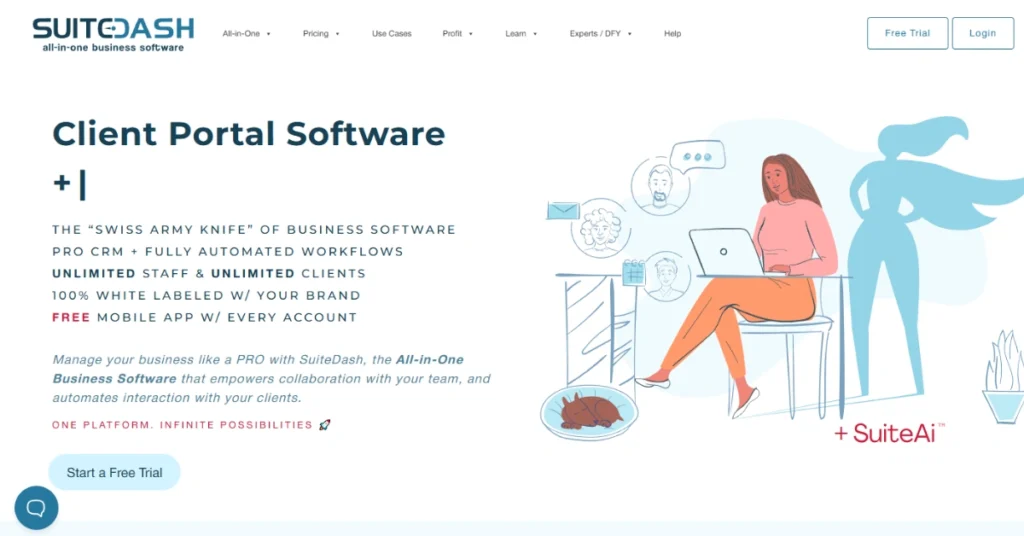
SuiteDash is more than a client portal. It’s a full business system for agencies that want everything in one place. Instead of switching between separate tools for CRM, projects, and billing, it gives you one branded workspace. You can customize almost everything – domain, login page, colors, and even the mobile app.
Plus, the platform covers the full client journey. CRM, proposals, billing, and communication all live together. Its white-label portal gives your clients a simple, professional space to check files, updates, and invoices.
Meanwhile, onboarding flows help new clients sign, pay, and submit details without back-and-forth emails. Automations link tasks, invoices, and reminders, cutting down manual work. Also, teams can track projects on Kanban boards, share files securely, and see progress in one view.
Pricing starts at $19 a month for the Start plan with unlimited users, contacts, and portals. Thrive, at $49, adds features like proposals and drip marketing. Pinnacle, at $99, includes automation and onboarding toolkits.
However, the trade-off is setup time – there’s a lot to learn, and the interface can feel busy until you get used to it. So, it’s not ideal for teams that want a quick plug-and-play setup, but once configured, it replaces several tools.
That said, SuiteDash’s integrations cover Stripe, PayPal, Braintree, and Authorize.Net for billing. As Benjamin L., an agency director, says, “It’s a great value. Everything’s here – you just have to set it up your way.”
Pricing of SuiteDash: From $19/month for the Start plan with unlimited users; advanced features available in the Thrive ($49/month) and Pinnacle ($99/month) plans.
Accelo: Best Client Work Management Platform

Accelo Pros
- Strong automation for tasks and workflows
- Built-in time tracking for accurate reporting
- Integrates well with CRMs and accounting tools
- Financial tracking links directly to project progress
- Secure cloud access with organized data control
Aceelo Cons
- Steep learning curve for new users
- Setup and onboarding can be time-consuming
- Feels heavy for smaller creative teams
Accelo is built for teams that handle a lot of client projects at once. It connects everything from proposals to payments, so you can track work, communication, and finances in one place.
The platform gives your team a clear view of projects, tasks, and timelines. You can log time manually, start timers, or sync with your calendar to keep records accurate.
In the meantime, its automation helps by turning templates into repeatable workflows and flagging potential delays early. Accelo also links time, expenses, and invoices, so you can see where projects stand financially.
It connects with QuickBooks, Xero, HubSpot, Salesforce, Google Workspace, and Microsoft 365. Payments work through Stripe, PayPal, or Authorize.net, keeping everything tied to your financial systems.
Mitch W. on G2 put it simply: “Consistency of data and information across all aspects of the platform, good and intuitive user interface.”
Thus, Accelo fits best for agencies or service businesses that manage ongoing client relationships. It might feel heavy for freelancers or tiny teams, but for growing agencies, the depth pays off.
Pricing of Accelo: Get price upon request
Zendo: Best for Managing Content Requests and Payments

Zendo Pros
- Clean, branded client portal for agencies
- Real-time chat improves client collaboration
- Built-in payments simplify billing and cash flow
- Easy setup for productized service offerings
- Strong white-label options for full brand control
Zendo Cons
- Limited design and layout customization
- Some advanced integrations are still in development
- Lacks deep analytics or reporting tools
Zendo is built for agencies that sell services, not hours. It replaces endless email threads and payment links with one clean space where clients can order, chat, and pay.
Plus, it’s simple, organized, and branded to look like your own system, not someone else’s. Every client gets a profile showing all their messages, files, and invoices. Teams can manage work in list, table, or Kanban views. Real-time chat replaces email back-and-forth, and private notes keep internal talks separate.
Moreover, you can manage payments inside the same feed through Stripe. On top of that, it automatically sends invoices and quotes and Zenbot handles reminders so you don’t have to.
Thanks to its service catalogs and intake forms, you can easily sell recurring or one-off content packages, collect details, and upsell extras.
Now, its Essential plan is free and supports unlimited clients and requests. The Pro plan costs $49 a month for two users, with extra users at $19 each. It adds white-label emails, custom domains, and integrations.
Finally, the Max plan at $199 a month removes Zendo branding and includes unlimited users. However, the only real drawback is limited design control and some features still in progress.
But it covers the gap by connecting with Zapier, and Rewardful, with more integrations coming. You can embed tools like analytics dashboards or forms.For agencies tired of jumping between tools, Zendo keeps everything in one place.
Pricing of Zendo: From $49/month for the Pro plan with two users included (+$19 per additional user); the Max plan offers unlimited users for $199/month.
Softr.io: Best Non-technical Client Portal Builders

Softr.io Pros
- No-code platform easy for beginners to use
- Fast setup with drag-and-drop interface
- Strong Airtable and Google Sheets integration
- Flexible branding with white-label options
- Secure data handling with SOC 2 compliance
Softr.io Cons
- Limited design and customization flexibility
- Learning curve for complex automations and logic
Softr.io removes the madhouse of scattered sheets, emails, and tools and turns it into one branded portal. To do that, you don’t even need a developer. Just drag blocks, connect your data, and you’ve got a working client portal in a few hours.
What makes Softr stand out is how naturally it fits into existing workflows. You can pull live data from Airtable or HubSpot, and add login permissions. Even better, it lets your clients view their own dashboards or project status without exposing your whole backend.
It even supports e-signatures, file uploads, and Stripe payments, so clients can approve, sign, and pay without leaving the portal.
Also, agencies use it for project tracking, onboarding, or simple client dashboards. Besides, Mateus R. says on G2, “Its intuitive design makes it easy to use, and the knowledge base provides helpful guidance for accomplishing any task.”
That sums up the experience well!
Now, Softr’s integrations run deep! Zapier, Make, and n8n handle automation, while live data sync keeps everything up to date across tools. And yes, it’s SOC 2 and GDPR compliant, so you’re not trading usability for safety.Pricing of Softr.io: From $59/month for the Basic plan (includes 20 users and 3 published apps); additional users cost $10 per 10 users under higher tiers.