Skip to content
  Once in a lifetime deal →





Hello Bonsai seems like a good deal for small businesses that mostly deal with proposals and automation.
Of course, you can’t tell if it’s good unless you try it. But we have extensively used it, and in this review, we’ll walk you through Hello Bonsai’s pricing, features, and what real users say about it.
You’ll also see where it falls short for agencies and how Agency Handy fills those gaps. By the end, you’ll know which tool makes sense for the way you run your business.
Key Takeaways
- Bonsai works best for solopreneurs who need proposals, contracts, invoicing, and time tracking in one place.
- Bonsai frequently freezes payments of new clients without any explanation. Their software has a steep learning curve as well.
- Agency Handy was built for agencies and scaling. You can manage clients, projects, invoices, and subscriptions in one platform. As a Hello Bonsai alternative, per user cost is much affordable with Agency Handy.
Quick Comparison: Bonsai vs. Agency Handy
Bonsai is most suitable for solopreneurs for proposals, contracts, and automations. It comes with 2 major issues – payment freezing and expensive per-seat cost.
Whereas, for agency operations, Agency Handy is a better Bonsai alternative in terms of pricing, features like a feedback tool, subscription management, and overall convenience.
| Features | Bonsai | Agency Handy |
| Pricing | $25/user/month | $19/month |
| Recurring Billing | ❌ | ✅ |
| Service Catalog | ❌ | ✅ |
| Client Portal | ✅ | ✅ |
| Project Management | Generic list view | Kanban board view |
| File Feedback | Basic comments | Advanced annotation tools |
| Support | MessagingEmail | MessagingEmailBuilt-in ticket system |
| Best For | Freelancers & solopreneurs | Small to large agencies |
Takeaway: Bonsai is enough if you’re managing a small business all your own. If you’re running an agency, Agency Handy gives you more control and better value.
Hello Bonsai Key Features
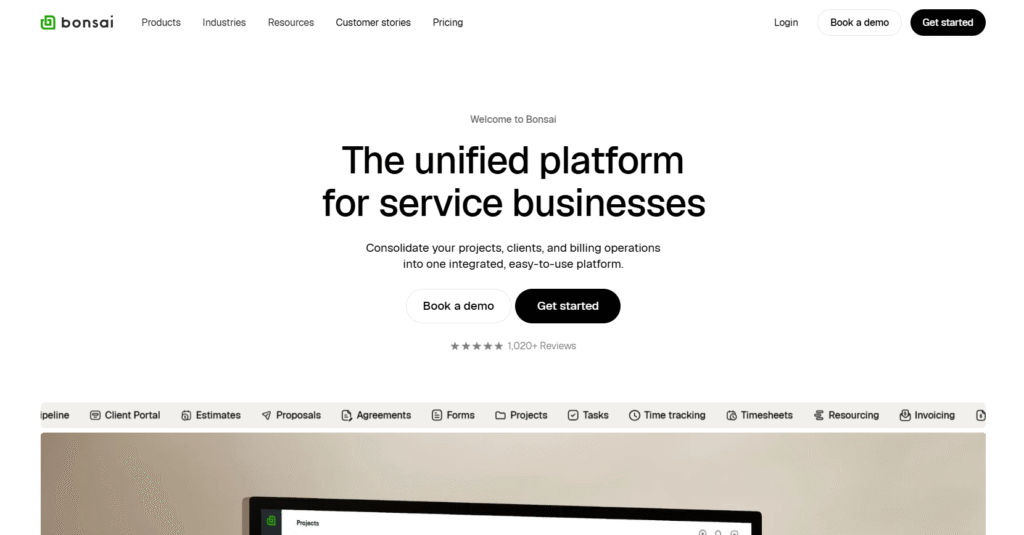
Apart from Hello Bonsai proposals, the tool comes with some useful features targeting small businesses and solopreneurs.
Proposals and Contracts
Bonsai makes it simple to create proposals and turn them into contracts. You can use Bonsai proposal templates, send them for e-signature, and track when clients sign. For freelancers, this cuts down on back-and-forth and speeds up the start of a project.
Time Tracking
Bonsai includes built-in time tracking. You can start a timer while you work or log hours manually. It helps when you bill clients hourly and want a simple record of time spent.
Agencies, however, usually need more than just a timer. Agency Handy adds task-based time tracking tied to projects and timesheets. This gives you a full view of how your team’s time links to revenue and expenses.
Invoicing and Payments
Bonsai makes it easy to send invoices and collect payments online. You can add line items, taxes, and due dates. Bonsai invoice and payments connect through Stripe or PayPal, which is fine if you just need basic billing.
But invoices alone don’t cover subscriptions or recurring services. As a Hello Bonsai alternative, Agency Handy includes both one-time invoices and recurring billing cycles. This is useful if you run retainers, subscription plans, or service packages.
Client Management
Bonsai CRM isn’t robust compared to mainstream CRMs. You can store client details, track projects, and keep a record of documents. For freelancers, it’s a neat way to keep everything in one dashboard.
For agencies, client management needs to go deeper. Agency Handy offers full client profiles, internal notes, file sharing, and a branded client portal. This makes clients feel like they’re working inside your system—not just another shared workspace.
Task Management
Bonsai project management lets you create simple task lists for clients. You can set due dates and mark items complete. For freelancers, this is enough to keep track of deliverables on a small scale.
But agencies usually need to manage both internal tasks and client-facing tasks. Agency Handy separates the two. Your team can work privately on tasks, while clients only see what’s relevant to them. This keeps projects clean and avoids confusion.
Forms and Questionnaires
Bonsai includes client intake forms and questionnaires. You can send these to collect details before starting work. It’s a quick way to gather requirements, especially for one-off projects.
The issue is that forms in Bonsai are basic. Agency Handy gives you more flexibility—public forms, lead capture forms, and order forms tied directly to services. You can even connect them to invoices or subscriptions. That means you don’t have to chase clients for details or payments in separate steps.
Collaboration and File Sharing
With Bonsai, you can share files with clients inside the project. Everything stays in one place, which reduces messy email threads. For freelancers, this creates a smooth workflow.
Agencies often need more structure. Agency Handy provides a branded client portal where clients can upload, comment, and approve files. You can also manage feedback directly on documents or designs, so revisions are tracked without extra tools.
Reporting
Bonsai gives you basic reporting on invoices, payments, and time logged. You can see earnings, outstanding invoices, and tracked hours. For freelancers, this helps with taxes and planning.
For agencies, you’ll want financial insights that tie back to clients and projects. Agency Handy connects time tracking, invoices, and expenses. You can see what services are profitable, where time is being spent, and how recurring revenue adds up.
How to Sign Up and Log In to Bonsai
Hello Bonsai comes with a 7-day free trial. It’s a good idea to try the free version before committing. There’s no need for a credit card to sign up.
Step 1 – Sign up with your Email

You will need an email to sign up for Bonsai. Gmail will do it as well. Enter your work or personal email, name, and password.
Step 2 – Give Basic Information About Your Business

Then, you’ll have to give some basic information about your business type, name, and location.

Bonsai also requires some internal business information to get started. From the dropdown menu, select what type of business you have, the number of employees, and whether your company works with subcontractors or not.
Step 3 – Set up currency

The next sign-up screen will ask you about the currency, yearly revenue, and your business phone number.
Step 4 – Invite Your Team

Now, this step is optional. You can invite your team by adding their emails, or you can skip it and proceed to the next step.
Step 5 – Reasons to try Hello Bonsai free trial

Here, you’ll have to select the reasons why you would use Bonsai. You can choose multiple reasons.
Step 6 – Get started with Hello Bonsai

Once you’re successfully signed up, you will see a welcome screen.
The dashboard gives an overall overview of Project Timeline, Activity, Profit & Loss, Time Tracked, and Tasks.
Hello Bonsai app interface primarily has 7 tabs –
- Dashboard: At a glance, Project Timeline, Activity, Profit & Loss, Time Tracked, and Tasks.
- Client management: Clients, contacts, deals, estimates, proposals, contracts, forms, scheduling, services, and client portal.
- Project management: Projects, tasks, time tracking, timesheets, and resourcing.
- Financial management: Overview, invoices, income, expenses, taxes, and rate cards
- Reports: Activities, profitabilities, forecasts, and invoices.
- Automation: Trigger-based automatic actions.
- Your profile: Settings, team, subscriptions, referrals, etc.

The welcome screen will ask you to add your company details. You can do it now, or skip the step.

If you decide to proceed, you will have to input your business name, address in details, currency, etc.
Step 7 – Add business image and logo

When you proceed to the next, you will see an option for adding your business image or icon.
Step 8 – Invite Team Members

You will be asked to invite the team as well.
If you decide to add your team, add their email addresses, set profile permission, assign project and role. If you don’t have any project yet, you won’t see related dropdown options.

Step 9 – Create a project

Then, if you need to create a project now, you can do it from here.

Step 10 – Client’s details

Add your client’s name, give the project title, and set the billing type.
If you proceed further, you will see a screen to input full details of your project and task.k.
Bonsai Pricing
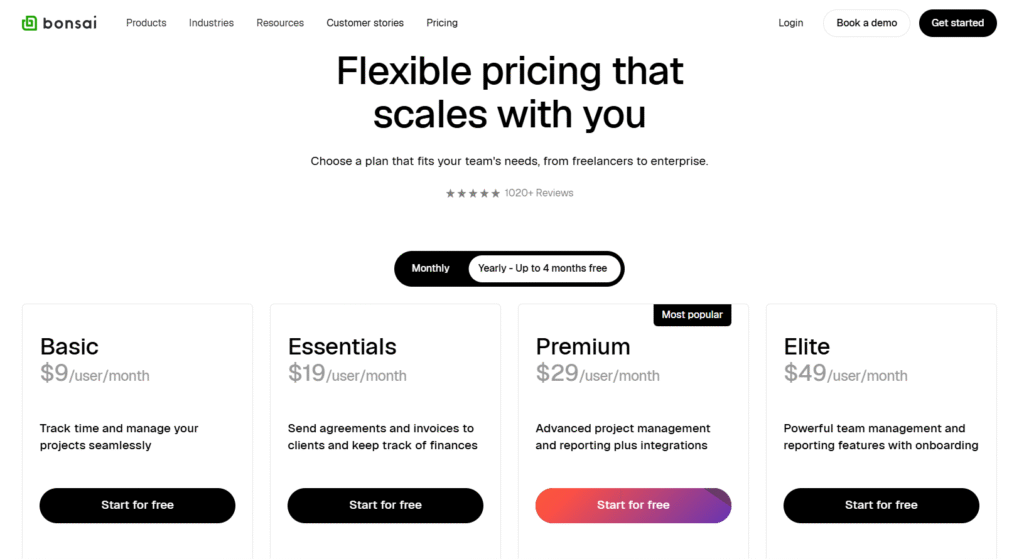
Bonsai comes with 3 pricing plans: Basic, Essentials, and Premium.
Basic
This is Bonsai’s entry-level pricing plan, suitable for freelancers who only need task management software with basic CRM functionalities and time tracking.
- $15/user/month billed monthly
- $9/user/month billed yearly
Suitable for: Beginner freelancers and small business owners.
Essentials
Being a mid-tier plan, it comes with some useful features like proposals, contracts, forms, scheduling, a client portal, etc.
- $25/user/month billed monthly
- $19/user/month billed yearly
Suitable for: Busy freelancers and small businesses needing to schedule meetings and send proposals more often.
Premium
This is Bonsai’s top-tier plan. Workflow management, deals pipeline, integration, etc. are the most standout features of this plan.
- $39/user/month billed monthly
- $29/user/month billed yearly
Suitable for: Freelancers and small businesses needing to automate workflow and web apps integration.
Elite
Their max-out plan costs as below –
- $59/user/month billed monthly
- $49/user/month billed yearly
Hello Bonsai Limitations
Even though Hello Bonsai is a well-marketed business management software, it comes with some major drawbacks, like payment freezing issues, unstable performance, and slow responses from the support team.
But surprisingly, influencer marketers don’t highlight its flaws.
- Bonsai Freezes Payment without Valid Reasons
According to many users, Bonsai freezes the payment of its users. Even when the account owners provide valid documents of their businesses, they don’t seem to respond to it, and to make matters worse, they refuse to release the payment.
So, if you have to use Bonsai, make sure you receive payment through other mediums like Stripe, PayPal, or Wise.
- Instability
Compared to other platforms, Bonsai has more features. But they seem to focus on the quantity, rather than the quality. Their slow response to fixing issues that clients faced shows that bringing stable features isn’t their concern.
- Slow Response
Users often complain that they reach out to Bonsai for issues they face, but Bonsai is extremely slow to even address and acknowledge them.
Bonsai Review Reddit: What do Redditors Say?
Hello Bonsai reddit reviews will give you an idea of what this app would look like when you use it. We reviewed all possible Reddit threads about the Bonsai app and found that freelancers and small businesses have praised it. And on the flip side, people highlighted some major setbacks of this platform.
As a business management software, freelancers seem to be happy with Bonsai.
“Hello Bonsai is a business management software that helps with invoicing, client management, contracts, bookkeeping, and more. It is designed to be an all-in-one solution for freelancers, so it can handle virtually all tasks related to running your business.” r/smallbusiness
I ended up choosing Bonsai, it has everything I needed. No need to mix it with other tools, it covers everything Teamwork has, plus billing, contracts, proposals and a client portal. It also gives you profitability reports & revenue forecasts. r/agency
I love the iOS and macOS menu bar apps for time tracking. It allows me to track my time on the fly and add those unbilled hours to my next invoice in one click. I haven’t been able to find this simple feature in any of the other alternatives. r/smallbusiness
But users reported a serious issue about payment holding as well as freezing.
My client, a doctor’s office, made a deposit for a project, and Bonsai held the payment for two weeks claiming it was under review. After jumping through every hoop they threw at me—answering endless questions and providing all the info they requested—they still denied the payment! To make matters worse, they told me to go find another payment platform. r/smallbusiness
You will find other users also complaining about the same issue in the same thread. They frequently freeze payments of their new clients.
Bonsai has very slow responding support, according to several users complaining on Reddit.
I recommend against hello bonsai. I’ve been on it for a year and I plan to switch when I can get to onboard a new platform. It overpromises and under delivers, is buggy, and clunky. And over priced for what you are getting. r/smallbusiness
Support has all but ignored my messages about these issues, saying they’ll notify me when they’re fixed. But the apps started working for me again without hearing a word from them. r/smallbusiness
Hello Bonsai User Experience
Bonsai user experience is great for their modern UI interface and advanced workflow.
Professional Looking Platform
Bonsai presents itself as a polished tool. Proposals, contracts, and invoices look professional out of the box. That means even freelancers with no design background can impress clients.
Modern UI and Interface
The dashboard is sleek and easy to navigate. Projects, tasks, and billing are laid out clearly, so you don’t spend time hunting for features. Most actions take just a few clicks, which makes the platform approachable for new users.
Beneficial Onboarding Workflow
Bonsai is quick to set up. New users can start tracking time, creating contracts, or sending invoices in minutes. The guided steps during onboarding reduce the learning curve, especially for solo users who don’t want to waste time on setup.
Conclusion
If you know a small business or you’re an entrepreneur, Hello Bonsai would still be a good deal if you don’t care much about the user interface and steep learning curve. However, their payment freezing issue is quite a serious thing.
So, better proceed with caution. For agency operations, Bonsai won’t be as cost-effective and functional as Agency Handy, starting from $19/month.
Frequently Asked Questions
Is Hello Bonsai worth it for solopreneurs?
Hello bonsai is a good fit for solopreneurs who need to send proposals more often. However, it does have some steep curve learning and payment freezing issues without any explanation.
Is Hello Bonsai good for agencies?
Hello Bonsai is expensive for agencies due to its high cost per user seat. Per user costs $25/month, which is the minimum for agencies. So, if there are 10 internal members, the cost would be $250/month.
How’s Hello Bonsai work automation?
For deal pipelines and other if/not-based workflows, Bonsai automation is good enough. But if your business doesn’t heavily rely on automation, it can be expensive.