Skip to content
  Get the best 3-year deal NOW →




Moxo, unlike many platforms, doesn’t provide clear pricing details directly on their website. However, through extensive research, we’ve gathered valuable insights into their pricing structure.
Moxo offers three main pricing plans—Business, Business Pro, and Enterprise—each designed to fit different business needs. Here’s a quick look:
- Business Plan: $450/mo billed annually with
- Business Pro Plan: $1000/mo billed annually.
- Enterprise Plan: Custom pricing for larger businesses.
To further clarify how these plans can impact your business, we’ll dive into the specific features, benefits, and value each plan provides.
Key Takeaways
- Moxo offers three pricing tiers: Business costs $450/month, Business Pro costs $1000/month, and Enterprise cost is custom for large businesses.
- Additional costs are required to add internal users, storage upgrades, and setup fees based on usage.
- Alternative like Agency Handy offers a complete agency management solution starting from just $13/month (billed annually).
What is Moxo?
Moxo is a client interaction platform that simplifies business communications, project management, and workflow automation. It’s designed for businesses working closely with clients, vendors, and partners in a secure and collaborative environment.
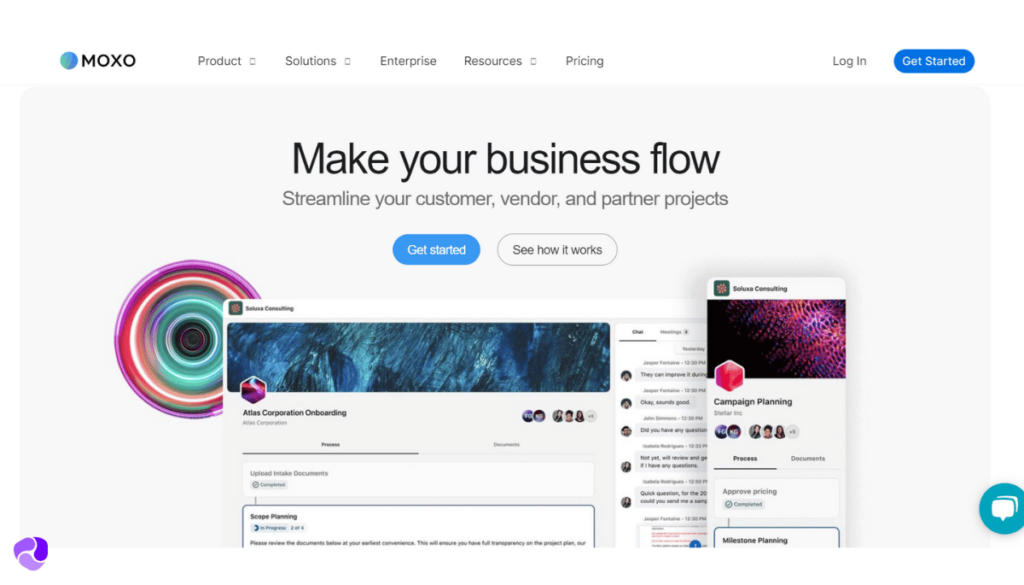
With Moxo, you can create shared workspaces where users can easily collaborate through messaging, file sharing, and video meetings. It also helps you automate tasks like document requests, approvals, and e-signatures, cutting down on manual work and saving you time.
As Moxo is an enterprise level solution, its low tier plan starts from $450/mo. Then its mid-tier plan costs $1000. For enterprises, it offers custom pricing. There will be some hidden charges as well.
Considering the price, Agency Handy is a much better and affordable solution for large agencies and businesses. Just at $66/mo annually billed, agencies can efficiently manage all their team, projects, and clients. For large businesses, Agency Handy’s top-tier plan only costs $133/mo annually billed.
Agency Handy helps you to –
- Automate client onboarding
- Add 10 or 30 team members
- Manage projects
- Up to 5 workspaces
- White-label client portal
Whereas, Moxo charges extras for adding team members and making it completely white-label.
Moxo Pricing: A Quick Look at the Plans
Moxo offers three pricing plans designed to meet the needs of different businesses:
- Business
- Business Pro
- Enterprise
Here’s a quick comparison of the key features across these plans:
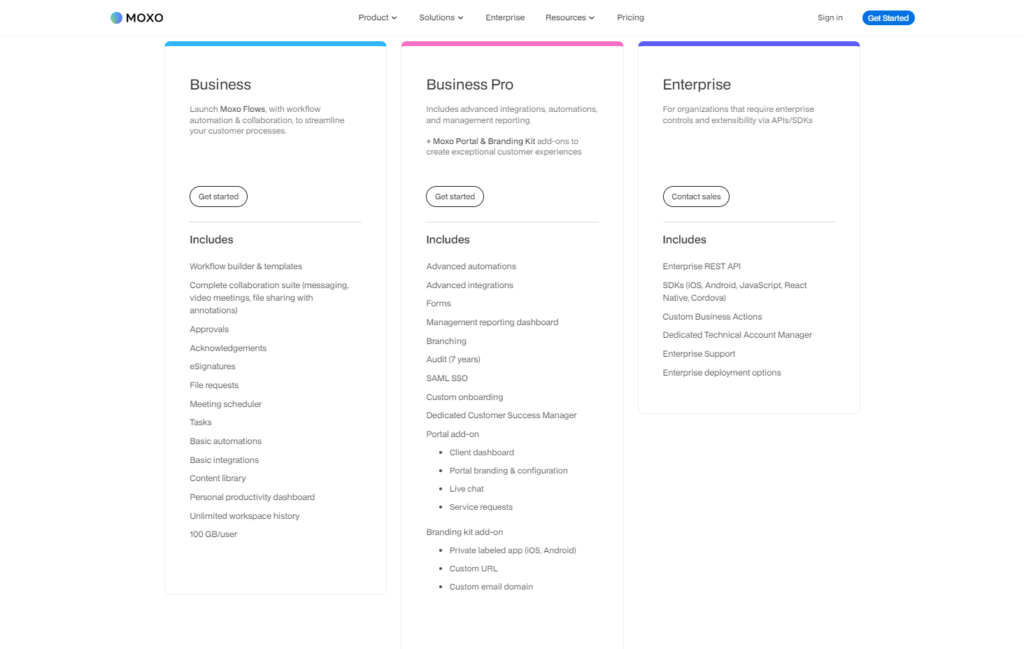
| Features | Business | Business Pro | Enterprise |
| Cost (Billed Annually) | $450/month | $1000/month | Custom Pricing |
| Storage | 10 GB | 25 GB | 250 TB |
| Client Portals | ✅ | ✅ | ✅ |
| Video Meetings | ✅ | ✅ | ✅ |
| Custom Branding | ❌ | ✅ | ✅ |
| Third-Party Integrations | ❌ | ✅(e.g., DocuSign) | ✅ (API/SDK Access) |
| API/SDK Access | ❌ | ❌ | ✅ |
| Private Cloud Options | ❌ | ❌ | ✅ |
How is Moxo’s Cost Calculated?
Moxo’s pricing is determined by several key factors, with the primary one being the plan tier you select. Each tier offers different features and user capacities, affecting the overall cost. Here’s a breakdown of what influences Moxo’s pricing:
Factors Affecting the Price
- Plan Tier: The cost is first determined by the plan—Business, Business Pro, or Enterprise. Each plan comes with its own set of features, storage limits, and integrations.
- Number of Users: Each plan includes a specific number of users (10 in Business and 40 in Business Pro). As your team grows, you’ll need to add more users, which will increase the cost. The Enterprise plan offers custom user packs.
- Storage: Each plan comes with a specific amount of storage—10 GB for Business, 50 GB for Business Pro, and 1 TB for Enterprise. If you need more storage, this will also affect the final price.
- Custom Features: For larger businesses, Moxo offers custom solutions, including private cloud options and additional integrations. These customizations typically involve a consultation with the sales team to determine the exact pricing.
Moxo Pricing: A Complete Breakdown of Each Plan
Moxie pricing starts from $450/mo to $1000/mo. They also offer custom prices for enterprise solutions, which can’t be specified. The following sections will review Moxo pricing plans and let you know these plans will help your business.
Moxo Business Plan

The Business plan is Moxo’s entry-level option, ideal for small teams looking to automate client interactions. Priced at $450/mo billed annually, it offers the basic tools you need to manage client communication and agency workflows effectively.
Moxo provides shared workspaces where your team and clients can communicate through messaging, video meetings, and file sharing.

One of the key features is workflow automation. You can create templates for repeated tasks like document requests, approvals, or e-signatures.
The plan includes 10 GB of storage per user, enough for small teams to handle file sharing and storage. With more users, the cost would multiply.
While the Business plan doesn’t offer custom branding or advanced integrations, you can handle project management and client communication well.
Agency Handy as a Moxo alternative costs only $66/mo billed annually for its agency focused “Team Starter” plan. You can automate client onboarding, add up to 10 internal users, have complete white-label branding including a custom email, and 2 TB storage.
Features of the Business Plan
Each feature within the Business plan supports efficient client interactions and project management, making it a practical solution for small teams.
- Workflow Automation: Automate key processes like document requests, approvals, and e-signatures with pre-built workflow templates.
- Secure Client Workspaces: Create shared, secure workspaces for client collaboration offering real-time messaging, file sharing, and video meetings, in one place.
- E-Signatures and File Sharing: Collect client approvals with built-in e-signature tools and securely share documents within the platform.
- Task and Progress Management: Assign and track tasks real-time within the platform to ensure projects stay on schedule.
- Document Storage: The Business plan includes 10 GB of secure storage per user for managing and organizing key documents.
- Video Meetings: Arrange video meetings directly in Moxo, no third party apps required.
Pros of the Business Plan
- Automates tasks like approvals and document requests.
- Secure workspaces for client and team interaction.
- Includes built-in e-signature tools for easy client approvals.
- Offers 10 GB of storage for files per user.
Drawbacks of the Business Plan
- Per user cost is pretty high.
- Does not offer third-party integrations like CRM tools.
Moxo Business Pro Plan

The Business Pro plan is Moxo’s mid-tier option, designed for growing teams that need advanced tools for client communication and project management. Priced at $1000/mo billed annually, it comes with advanced features that expand on the essentials from the Business plan.
A key upgrade in the Business Pro plan is expanded workflow automation with templates. This feature helps you automate repetitive tasks like approvals, document requests, and e-signatures. You can also implement “if/then” rules based workflows.

The plan also includes 25 GB of storage per user, offering plenty of space for managing documents across multiple projects. Additionally, the Business Pro plan offers custom branding to showcase your company’s logo and colors.
Overall, the Business Pro plan is an excellent choice for businesses worried about client portal pricing for their client management with advanced features and customizations.
If you don’t need automation and workflow, and all you want is to streamline business operations, Agency Handy’s Business Pro plan at just $133/mo (billed annually) can be the best Moxo alternative.
You can add up to 30 users, up to 5 workspaces, white-label everything, and have up to 10 TB of storage.
Features of the Business Pro Plan
The Business Pro plan offers a significant upgrade in terms of workflow automation and customization, making it a great option for growing businesses.
- Expanded Workflow Automation: Includes workflow templates for automating tasks like document requests, approvals, and e-signatures, offering more flexibility for managing complex processes.
- Custom Branding: Customize client portals with your company’s logo and colors, providing a branded experience for users.
- Advanced File Sharing and Storage: Offers 25 GB of storage to securely manage and share larger volumes of documents for projects.
- Third-Party Integrations: Integrates with third-party platforms for data syncing like Salesforce or HubSpot, triggering external platforms workflows from Moxo, and custom integration through Zapier.
- Embeddables: Embed messaging, meetings, document sharing, forms, and other essential workflows directly into the interface.
- Reporting Dashboard: Dashboard showing insights into team performance, tracking key metrics, and identifying bottlenecks to make data-driven decisions.
Pros of the Business Pro Plan
- Enhanced automation saves time by reducing manual processes.
- 25 GB of storage ensures ample space for handling larger projects.
- White-label branding for professional appearance.
- Integrations with tools like DocuSign streamline document workflows.
- Secure workspaces provide a safe environment for team and client collaboration.
- Advanced security features like SSO offer peace of mind for data protection.
Drawbacks of the Business Pro Plan
- Higher costs may not be suitable for smaller teams.
- Expensive per user cost.
Moxo Enterprise Plan

The Enterprise plan is Moxo’s most advanced offering, tailored for large organizations for more customized solutions.
With flexible pricing based on your business’s specific needs, this plan is ideal for companies with complex workflows and higher security requirements.
One of the key benefits of the Enterprise plan is its custom user packs, allowing you to scale the number of users as your team grows. It’s perfect for large teams needing flexibility and advanced collaboration features.
Secure workspaces are central to the plan, offering messaging, video meetings, and file sharing in a controlled environment.
A standout feature of the Enterprise plan is access to Moxo’s API and SDK. It enables deep customization and seamless integration with your existing systems.

Your business can build Moxo’s secure messaging, document collection, and workflow capabilities directly into your existing client portal or mobile app. This creates a powerful, unified platform where your clients never have to leave your digital ecosystem
You also have the option for private cloud or on-premises deployment for full control over data and security.
If your business needs advanced customization, top-level security, and scalable user access, the Moxo Enterprise plan provides the flexibility and tools to meet your unique requirements.
Features of the Enterprise Plan
The Enterprise plan’s features are designed for businesses that require advanced tools, custom solutions, and top-tier security.
- Custom User Packs: Allows you to scale user numbers according to your organization’s needs, ensuring flexibility as your team grows.
- API and SDK Access: Provides full API and SDK access for deep integration with your existing systems.
- Private Cloud or On-Premises Deployment: Offers private cloud or on-premises deployment options ensuring full control over your data security and compliance requirements.
- 250 GB of Storage: Includes 250 GB of secure storage for managing large volumes of project files.
- Custom Workflows: Allows for custom workflow creation to automate specific business processes.
- Advanced Security Features: Enhanced security measures, including Single Sign-On (SSO) and other enterprise-level security protocols.
- Third-Party Integrations: Integrates with popular tools like DocuSign and other business platforms for smooth data synchronization and improved workflow.
Pros of the Enterprise Plan
- Custom user packs allow flexible scaling for large teams.
- Deep system integration with third party platforms
- 250 GB of storage for large project files.
- Custom workflows improve efficiency by automating complex tasks.
- Enterprise-level security features protect sensitive client data.
- A dedicated technical account manager for complex processes.
Drawbacks of the Enterprise Plan
- Custom pricing may be too high for smaller businesses.
- Private cloud or on-premises options could increase setup complexity.
- Requires dedicated IT resources to manage security and integrations effectively.
Does Moxo Have Hidden Cost?
While Moxo’s pricing is generally transparent, there are a few additional costs that businesses should be aware of. These hidden costs can add up, especially for larger teams or businesses with advanced needs.
Cost Per Users
Moxo pricings are for single users. If you need to add more users from your team, the cost would multiply. This significantly increases the tool price. However, there might be some discounts if you directly talk to their support.
Storage Upgrades
While the Business and Business Pro plans come with 10 GB and 25 GB of storage, respectively, additional storage beyond these limits may require an extra charge, especially for data-heavy industries.
Private Cloud or On-Premises Hosting
For Enterprise users requiring private cloud or on-premises deployment, there are additional costs involved. These custom setups can be more expensive due to the higher level of control and security they provide.
Payment Processing Fees
Moxo integrates with third-party services like DocuSign, which can incur additional transaction fees depending on the service used.
For example, if you process payments through DocuSign and Stripe, standard transaction fees apply, such as 2.9% + $0.30 per transaction for credit card payments.
These fees are separate from Moxo’s pricing and can add up if your business frequently uses these integrations.
Be sure to keep these extra fees in mind when planning your expenses with Moxo.
Does Moxo Offer a Free Trial?
Moxo doesn’t offer any free trial or version of their features. Therefore, relying only on YouTube videos or forums is the last resource to figure out if this platform would truly benefit your business or not.
Is Moxo Worth The Price?
Moxo is worth the price for large businesses and enterprises. Here’s a breakdown of who’s going to benefit from Moxo.
High-Touch Service Firms (Finance, Legal, Accounting)
- Complex client onboarding & workflows.
- Workflow Automation.
- Strict security & compliance needs.
- Bank-Grade Security & Audit Trails.
- Need for a premium client experience.
- Branded Client Portals.
Project-Based B2B Companies (Agencies, Tech Services)
- Centralized Collaboration Hub.
- Advanced Integrations.
Large Enterprises & Tech Companies
- Need to embed workflow features into the app.
- Enterprise API & SDKs.
- Absolute control over data is required.
- Private Cloud or On-Premise Deployment.
For small to large sized businesses and agencies, Moxo’s automated workflow is a huge plus. But even agencies with a limited budget will have to spend at least $450/mo, yet there won’t be any white-label branding and customization.
Moxo’s $1000/mo Business Pro plan comes with white-label, but there will be some fields with Moxo’s branding. Meaning a complete custom branding is only available in high-tier plans. Also, you get comparatively low storage.
From agency perspectives, providing services without custom branding would be a serious issue. It’s a major concern if your agency can’t afford $1000/mo. As you can see, the white-label option is locked behind a steep price tag. For smaller teams, that can be discouraging.
That’s where WithMoxie pricing makes sense. You spend far less and still get the tools you need, along with real human support when things get tricky.
Top 3 Moxo Alternatives & Budget-Friendly Choices
If you’re looking for a Moxo alternative, here are three options that offer a range of features and more budget-friendly choices for client and order management.
| Aspects | Moxo | Agency Handy | SuiteDash | ManyRequests |
| Free Trial | ❌ | 7 days | 14 days | 14 days |
| Pricing (annually billed) | $450/month | $13/month | $19/month | $19/month |
| Major Pros | Advanced workflow automationAPI Access | Service catalogAutomated client onboardingLead Pipelines | Customizable brandingCRM integration | Simplified client portal setupTask management |
| Major Cons | Higher cost for small teams | Lacks advanced automation | Steeper learning curve | Less customizable workflows compared |
| Best Suitable for | Large teams needing workflow automation and security | Agencies of all sizes that need client and service management | Businesses wanting an all-in-one business management platform | Agencies needing a simplified client portal solution |
| Customer Ratings | 4.5 out of 5 | 4.9 out of 5 | 4.8 out of 5 | 4.5 out of 5 |
Moxo vs Agency Handy
Moxo and Agency Handy have different business needs based on team size and operations.
Agency Handy excels in managing agencies of all sizes, focusing on client onboarding, client and team management. In contrast, Moxo is ideal for larger teams needing advanced workflow automation and secure communication.
But Moxo doesn’t offer a customizable service catalog, whereas Agency Handy offers a multi package catalog that can be embedded on your website. You can create up to 3 packages with separate pricing and offerings.
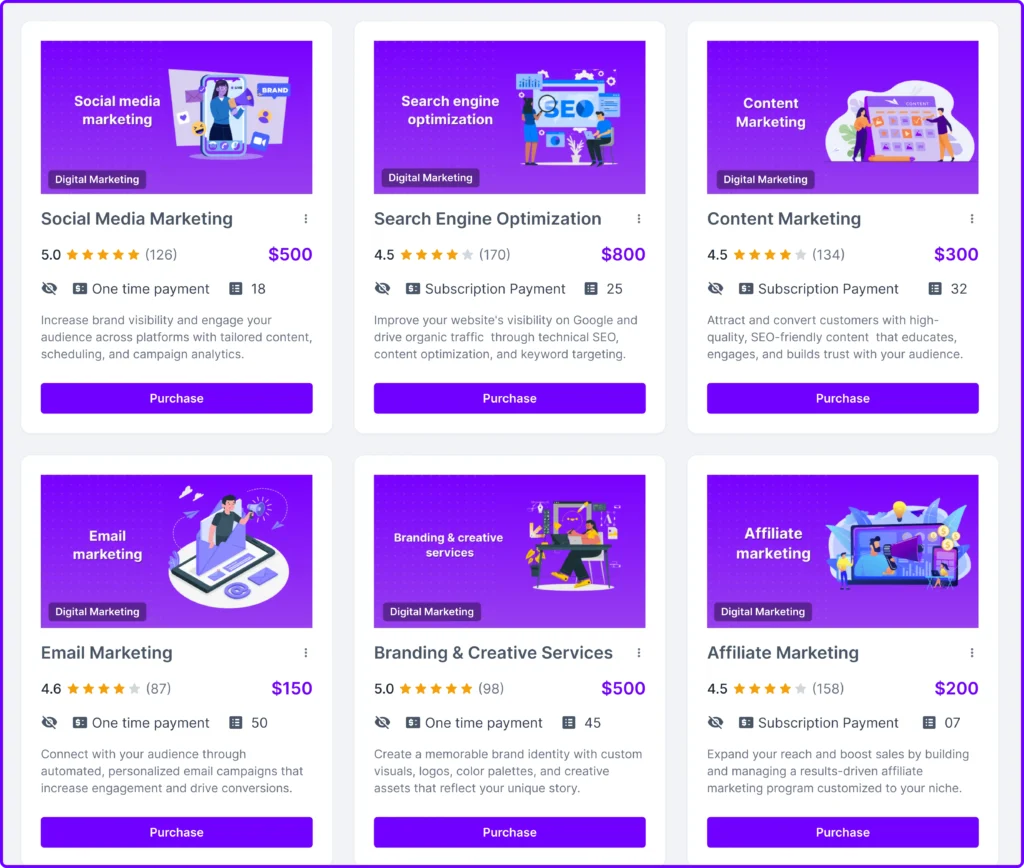
And you can set up default tasks for each service. Don’t have to rely on manual tasks creation anymore. It will give you more control and flexibility.
In terms of client onboarding, Moxo focuses on automated workflows suitable for larger teams with more complex processes.

On the other hand, Agency Handy takes a simpler, more intuitive approach with its intake and order forms. These forms gather important client information like project details and also allow you to upsell services with order forms.
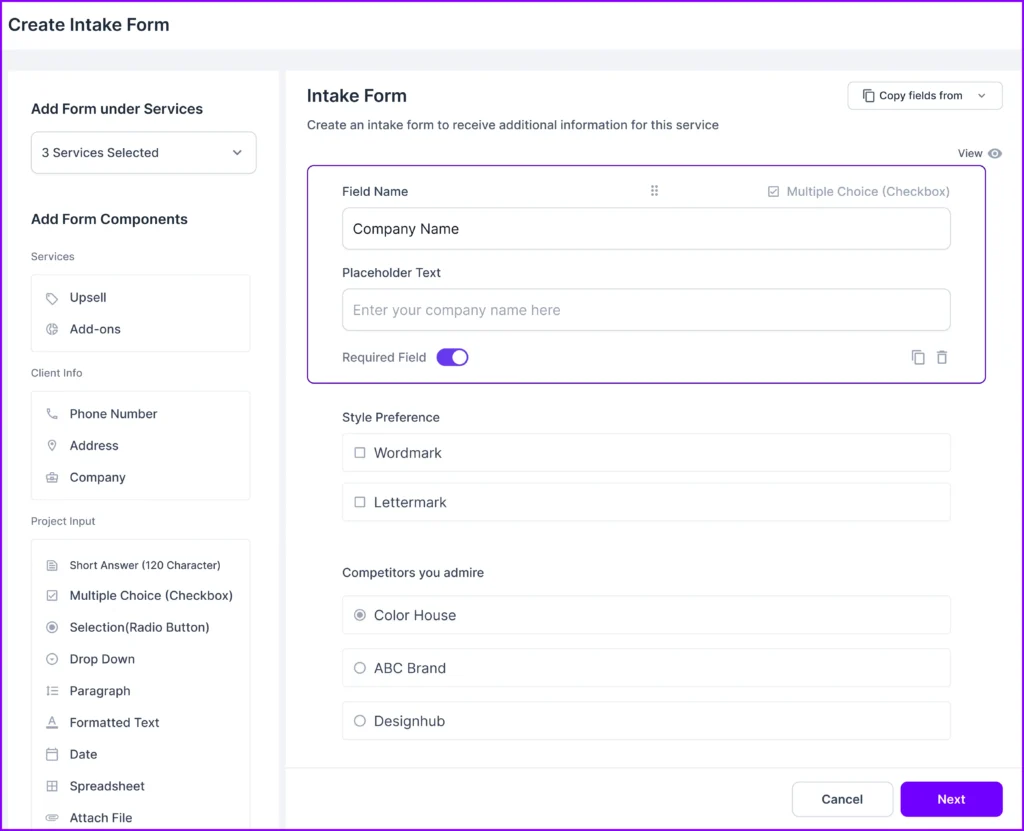
Customization is another key difference. Moxo reserves advanced customization for higher-tier plans, including features like custom workflows, branding, and API access.

In comparison, Agency Handy offers easy customization at all levels. You will get custom domain, custom emails, and complete white label branding everywhere.

For order management, Moxo follows a structured approach with specific projects and workspaces. Similarly, Agency Handy follows the same method, but there’s no workflow builder like Moxo.
In terms of payment management, Agency Handy offers broader flexibility with support for multiple payment gateways such as Stripe, Wise, Paypal, and manual banking.

Additionally, it includes features like automated invoice reminders and split payments, giving agencies an edge over client billing.
Moxo, on the other hand, also supports popular payment gateways like Stripe and PayPal.
Overall, If your business needs advanced automation and secure client interactions, Moxo may be the better choice.
But if you’re an agency looking for a cost-effective, flexible tool with customizable client onboarding, robust client, team and project management, Agency Handy offers an excellent alternative.
Further Read: Agency Handy vs Moxo
Moxo vs SuiteDash
Moxo and SuiteDash are both great tools, but they suit different types of businesses.
Moxo is built for larger teams needing advanced features like workflow automation, secure client communication, and private cloud options. It’s perfect if your business has complex needs, such as integrating APIs and maintaining high-level data security.
The platform also shines when it comes to automating repetitive tasks and managing big projects. Though its pricing is higher, making it more suitable for larger operations.
SuiteDash, on the other hand, is more affordable and ideal for small to mid-sized businesses. It combines CRM, client portals, project management, and billing in one platform. You can also customize your branding to offer a professional experience for clients.
Starting at just $19/month, it’s a budget-friendly option for businesses that need versatile tools without requiring the advanced security or automation features Moxo offers.
In short, Moxo is best for teams that need advanced security and efficiency, while SuiteDash is a great choice for businesses looking for a more affordable, all-in-one solution.
Note: Read Agency Handy VS SuiteDash to compare the two alternatives in-depth.
Moxo vs ManyRequest
When comparing Moxo and ManyRequests, both help you manage client interactions, but they serve different purposes.
Moxo offers secure workspaces where you can collaborate with clients through messaging, file sharing, and video meetings. This makes it ideal for businesses that handle complex projects and need centralized communication.
On the other hand, ManyRequests provides customizable client portals, allowing clients to track requests, payments, and tasks. It’s a simpler solution, perfect for smaller teams or agencies that need easy-to-use tools for client management.
When it comes to workflow automation, Moxo stands out by automating tasks like document requests, approvals, and e-signatures, reducing manual work and improving efficiency.
ManyRequests offers basic task management, which works well for teams with simpler workflows, but it doesn’t match the automation capabilities of Moxo.
In terms of customization and branding, Moxo offers more advanced options in its higher-tier plans, including API/SDK access and custom branding, creating a more polished client experience.
ManyRequests, while customizable, focuses on affordability and user-friendliness, offering basic branding features without additional costs.
Pricing is another difference. Moxo starts at $90/month, geared towards larger teams needing more features. ManyRequests starts at a more budget-friendly $29/month, making it ideal for smaller teams looking for essential tools.
For security, Moxo takes the lead with enterprise-level features like private cloud hosting providing better protection for businesses managing sensitive data.
If you need advanced workflow automation, secure workspaces, and custom integrations, Moxo is the better choice for larger businesses.
But if you’re a smaller team looking for a more straightforward and affordable solution, ManyRequests is a great fit.
Note: Read Agency Handy VS ManyRequests for a detailed comparison.
Final Thoughts
To sum up, Moxo offers powerful tools for businesses needing advanced client interaction management, workflow automation, and secure communication.
With features like e-signatures, private cloud options, and API integrations, it’s ideal for large teams managing complex projects.
However, for smaller businesses or agencies looking for a simpler solution, Agency Handy is good enough. With much less, you will have all essential features to run your agency and maintain good client relationships using Agency Handy.
FAQs
What type of customer support is available from Moxo?
Moxo offers comprehensive customer support, including live chat, email support, and a dedicated customer success team. Depending on your plan, higher-tier users may receive personalized onboarding assistance, priority support, and access to additional resources such as tutorials and documentation.
How is Moxo commonly used?
Moxo is commonly used for client interaction management, workflow automation, and secure document sharing. Businesses leverage Moxo to automate repetitive tasks like approvals, e-signatures, and client communication through secure workspaces, reducing manual effort and streamlining operations.
What types of businesses does Moxo serve?
Moxo primarily serves large enterprises and businesses that require advanced client interaction management, such as financial services, legal firms, consultancies, and real estate agencies. It’s also popular among teams that handle complex projects and need strong data security and customizable workflows.