Skip to content
  Once in a lifetime deal →




Keeping up with client emails, disorganized invoices, and overdue tasks can make you feel overwhelmed. 17hats is designed to fix that.
It centralizes your client, project, and financial management into one place by automating reminders, payments, and workflows.
Hence, we’ll break down how 17hats operates, its top features, honest pros and cons, and a simple setup process to make it work for your business.
Key Takeaways
- 17hats centralizes CRM, invoicing, scheduling, contracts, and client communication to help small teams become more productive and efficient.
- 17hats pricing offers three plans: pay monthly at $60, yearly at $600, or bi-yearly at $800. You can sign up for a 7-day free trial.
- But the best alternative to 17hats is Agency Handy, that starts at just $19/month ($156 yearly). It includes CRM, invoicing, built-in ticketing, time tracking, etc.
What is 17hats?

17hats is an all-in-one business management platform that combines invoicing, scheduling, contracts, client communication, etc. to simplify the daily business operations of small teams.
Plus, it connects your contacts, projects, and documents to automate reminders, payments, and tasks. With the 17hats app, you can also create templates, manage pipelines, and access a client portal for effortless collaboration.
Ideal users of 17hats are —
- Freelancers managing multiple clients
- Small business owners seeking organization
- Service-based professionals (e.g., photographers, designers)
- Event planners and wedding professionals
- Consultants and coaches
But starting at $60/month is too costly if you’re just starting out your agency or running a small business. Instead, you could get all of it in Agency Handy just for $19/month ($156/year).
How to Set Up and Use 17hats App
Getting started with 17hats software is quick, and once set up. Let’s get started —
Step 1: Create Your Account
Start by clicking the 7-day trial option on the 17hats signup. You’ll see a short form asking for some basic information.

Once you’ve filled in the details, just hit Create Account. That’s all there is to it!
Step 2: Access Settings
After logging in, click the gear icon in the top-right corner.
It’s your main control hub where you’ll configure branding, services, email settings, payment connections, and automation tools.
Spend some time here first to ensure that the rest of your setup flows smoothly.
Step 3: Customize Your Branding and Subdomain
Go to Brand Preferences to upload your logo, choose your brand colors, and set default fonts for all documents.
Then create a custom subdomain to change shared links for quotes, contracts, and forms from a generic URL to one with your business name.
Step 4: Add Contacts and Organize Them
From the Contacts section, use Add Contact to enter new leads, clients, and “Other” contacts like suppliers or partners. Assign each one a type (Lead, Client, Other) and apply tags for quick filtering later.
Step 5: Set Up Lead Capture Forms
Under Leads → Capture Forms, create forms with your questions, color scheme, and header image. Keep them short to get the essential details, like name, email, phone, and service interest.
Step 6: Build Your Services, Quotes, and Contracts
Add your services and pricing tiers inside 17hats. Create quote templates with optional add-ons to improve your order value.
Also, link quotes directly to contracts and invoices so clients can select a package, sign, and pay. You can use tokens to auto-fill client names, event dates, and service details for a personal touch.
Step 7: Automate with Workflows
Create multi-step workflows to handle routine tasks, like sending contracts, delivering questionnaires, or reminding clients about payments. You can insert time delays, add manual checkpoints, and personalize communications with tokens so automation never feels robotic.
Step 8: Set Invoice and Payment Preferences
In Invoices, set up branded templates with your logo and colors.
- Add tax rates, discounts, tipping options, and recurring invoice schedules.
- Then, connect Stripe to accept credit cards and ACH transfers.
- Turn on automatic invoice reminders for upcoming and overdue payments.
Step 9: Organize Projects and Tasks
Each client’s job is a Project in 17hats. Create them manually or import from a CSV if you have a lot. Inside a project, add milestones, assign tasks, and store all emails, files, and notes in one place.
Step 10: Use the Client Portal
Enable Client Portals to give clients secure access to their quotes, contracts, invoices, and event details. From settings, you can —
- Add a custom welcome message.
- Decide which documents they can see.
- Set password protection on their portal.
17hats Features: A Quick Look at Each Feature
17hats comes with all the features you need to manage client work, admin, and follow-ups all at once. Here’s a list of them —
- Unlimited contacts/projects
- Custom fields
- Invoices
- Quotes
- Contracts
- Custom logos, fonts, colors
- Online scheduling
- Client portal
- Multiple services and more.
Furthermore, we’ll explain each major feature for you so that you can weigh its value.
Lead Management and CRM

When a person fills out a connected form, their information is automatically saved as a new contact in 17hats CRM and assigned to a project. You can then organize them by adding tags, noting where they came from, and updating their status
Plus, its auto-fill tokens let you personalize responses with client names, event dates, or service details in seconds.
Contact and Lead Capture Forms

You can embed its customizable forms on your website or share as direct links. Submissions automatically create contact and project records, trigger workflows, and send personalized auto-responses.
Also, you can add custom questions to qualify leads or track marketing sources, and get instant mobile notifications for every new inquiry.
Quotes and Proposals

17hats allows you to send professional quotes with service packages, pricing tiers, and optional add-ons. From there, clients can choose their preferred package online, and expiration dates encourage quick decisions.
Questionnaires and Client Intake
Build questionnaires with open-ended or multiple-choice questions, images, and links. You can then trigger them automatically in workflows or send them manually.
Contracts and Digital Signing

Upload your own contracts or use industry-specific templates from the marketplace. These contracts support legally binding e-signatures, multiple signers, and required input fields.
Automation and Workflows
With 17hats, you can set up multi-step workflows to automate client communications and administrative tasks. Now, actions can include sending documents, assigning tasks, delivering questionnaires, or issuing payment reminders.
Client Portal

It allows you to give your clients password-protected access to their quotes, contracts, invoices, questionnaires, and event details. You can choose exactly what they can view, and add a welcome message with text, links, or images.
However, clients can’t upload documents to their own portal. Instead, if you want to share documents, you’ll need to store them on an external platform like Google Drive.
Then, simply add the link to those uploaded files in the Client’s custom ‘Welcome Message.
Invoicing

You can design branded invoices with your logo, colors, and personalized notes. Plus, add sales tax, apply discounts, set due dates, and create payment plans or recurring invoices.
However, it lacks granular tax configuration like Agency Handy.
With Agency Handy, you can set a zip code or a state to manage international billing without hassle. Plus, it automatically calculates all charges, including discounts, taxes (like VAT), and the final total.
Payment Processing

17hats accepts secure online payments through Stripe and ACH transfers (U.S. only). Plus, payments automatically sync with invoices, and you can record manual transactions like cash or checks.
Scheduling and Calendar Integration

It easily syncs with Google Calendar to prevent conflicts, add buffer times between appointments, and block personal dates. Besides, the automated reminders can go out one day and one hour before each booking.
Most importantly, group scheduling is available for workshops or events, and payments can be required at booking.
Project and Task Management

It allows you to organize work with project categories, milestones, and task assignments. Plus, you can assign tasks to team members, track deadlines, and store every related document and email in one place.
Meanwhile, tags and workflows help you manage multiple projects without losing track of progress.
Dashboard

Get a daily overview of your priorities with the built-in dashboard. You can view a 5-day calendar, weather forecast, recent client activity, and pending documents.
There’s also a “Let’s Take Care of Business” checklist. Each user sees only their own tasks, and archived projects stay hidden.
Related Contacts

It supports storing unlimited related contacts from vendors, family members, and collaborators under each project. You can email them directly, include them in contract signatures, and link them to multiple projects when needed.
Custom Fields

Create unlimited custom fields for contacts and projects to store details unique to your business.
You can insert these fields into documents and emails using tokens. On top of that, it offers to export those contact fields for reporting or marketing purposes.
Incoming Emails

Connect your email account so client messages automatically appear in their project file. It works with any email provider, and your inbox remains unchanged. 17hats will show emails only from saved contacts in the platform to keep your workspace clean.
3-in-1 Document
You can join a quote, contract, and invoice into a single file so clients can choose services, sign agreements, and pay in one step.
Any combination of one, two, or three documents is possible. Aside from that, you can do edits even after sending, with finalized versions requiring re-approval.
17hats Pricing: How Much Does It Cost?
You get one all-inclusive plan with 17hats, but you can choose how you pay for it. Here’s how each option works so you can pick what fits your budget and business style.
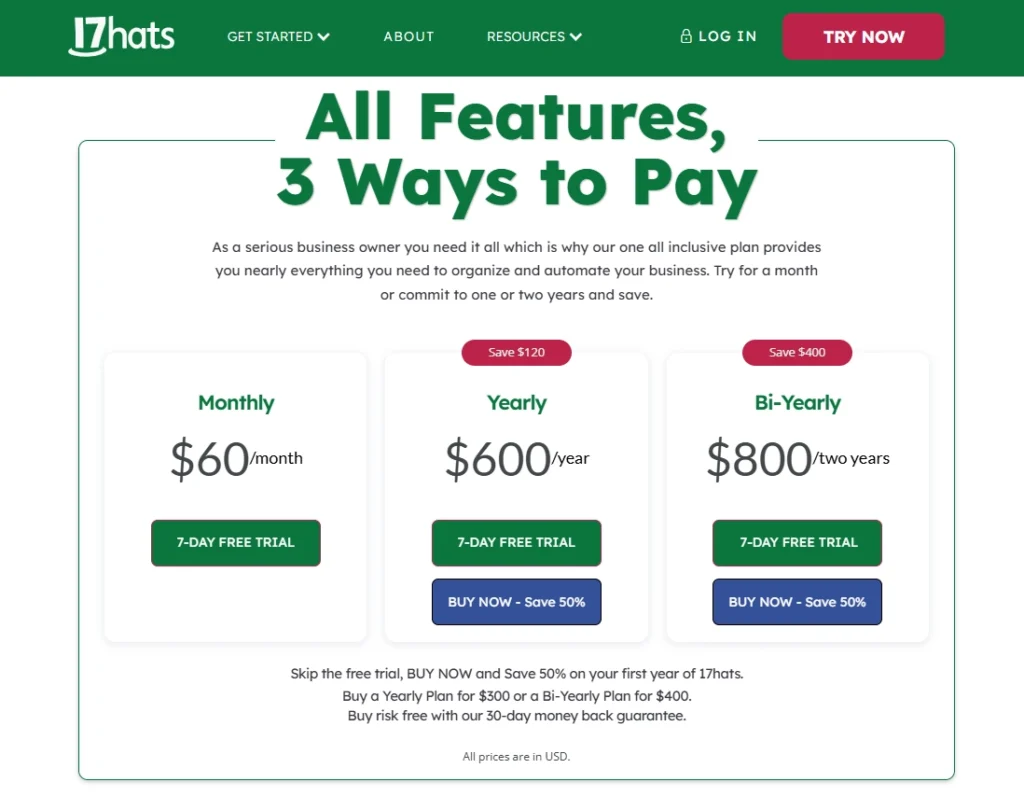
| Plan Name | Price |
| Monthly | $60 per month |
| Yearly | $600 per year |
| Bi-Yearly | $800 per two years |
Limitations of 17hats
Even though 17hats is a powerful all-in-one platform for small business owners, it isn’t the perfect fit for every type of business and still has some drawbacks worth noting.
Here are some of the limitations of 17hats —
| Limitation | Explanation |
| Limited invoice customization | No option to configure regional tax settings within invoices. |
| Paid time tracking add-on | Time tracking costs an extra $5 per month. |
| Additional Bank Connect fee | Bank integration requires an extra $5 monthly charge. |
| Complex initial setup | Email and bank account syncing can be difficult for new users. |
| Cluttered interface | The platform may feel overwhelming, especially for beginners. |
| Data loss after cancellation | Access to client and financial data ends immediately unless exported before canceling. |
| No live chat | Lacks built-in live chat for real-time client communication. |
| No ticketing system | No native tool for managing structured support requests. |
17hats Reddit: What Do Redditors Say?
Reddit feedback on 17hats shows a clear divide. Some value its simplicity, calendar integration, and ability to manage invoicing, contracts, and client tracking in one platform.
Meanwhile, some highlight the convenience of its lead capture forms without needing complex integrations. As u/spokenmoistly noted, “17hats is just so easy… all the features are well integrated with each other.”
However, others point to limited features compared to modern CRMs like Agency Handy. In fact, several users have moved to alternatives for stronger customization, reporting, and workflow capabilities.
In the end, if you want a straightforward, low-maintenance system for client and project management, 17hats remains a practical choice.
Top 3 Alternatives to 17hats: Agency Handy, Dubsado, and HoneyBook
Let’s see how the leading 17hats alternatives differ from managing leads to designing invoices.
| Platform | Multipackage Service | Lead Management | Built-in Ticketing System | Starter Pricing | Free Trial |
| Agency Handy | ✔️ | ✔️ | ✔️ | $19/month | 7-day |
| Dubsado | ❌ | ✔️ | ❌ | $20/month | Unlimited (for up to 3 clients) |
| HoneyBook | ❌ | ❌ | ❌ | $36/month | 7-day |
1. Agency Handy vs 17hats
At some point, managing orders, client messages, and team tasks across different tools slows you down. Agency Handy fixes that by putting everything in one place. Well, 17hats also tries to do that, but it can’t fully match. Let’s see how!
Right out of the box, you can make it yours with your logo, colors, and domain. Besides, the CRM takes leads from the first contact to the signed client.
Right after the purchase, every order turns into a project automatically. Then, you can break it into tasks, set deadlines, and track everything on a Kanban board.
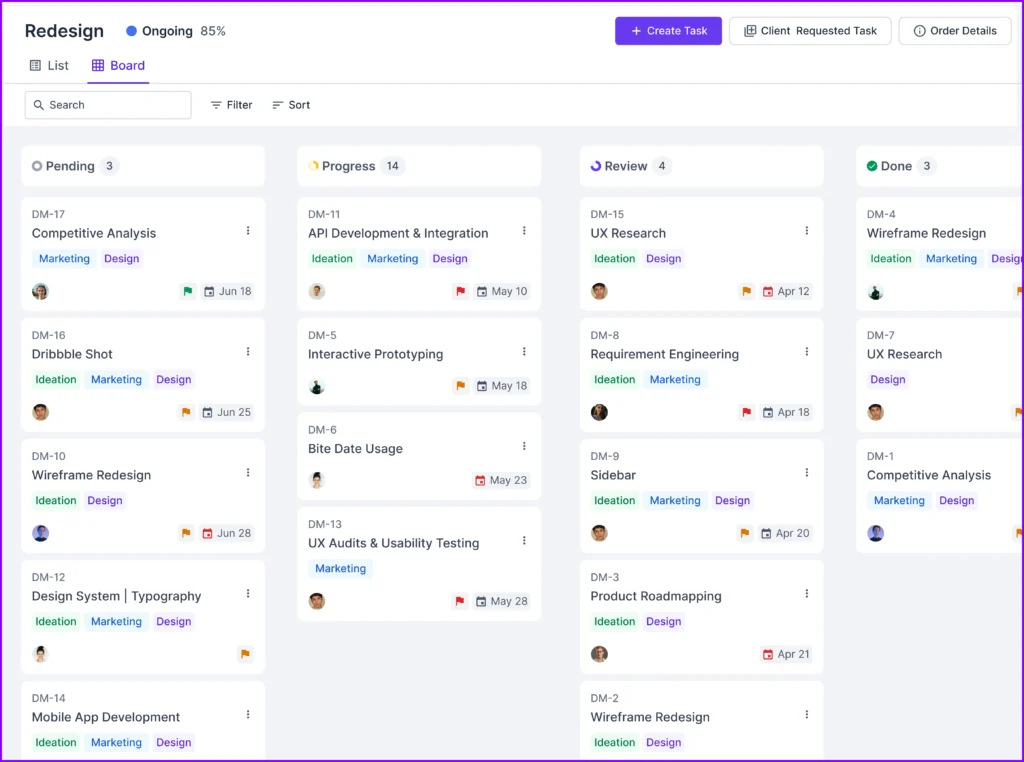
Unlike 17hats, you’ll also get a built-in ticketing system and time tracking, so client support and delivery stay inside the same workspace. Meanwhile, your service catalog, add-ons, and coupons make your selling straightforward.

Plus, Billing is built in. You can create one-time or recurring invoices, set tax rates, and take payments via Stripe, PayPal, Wise, manual banking, or crypto.
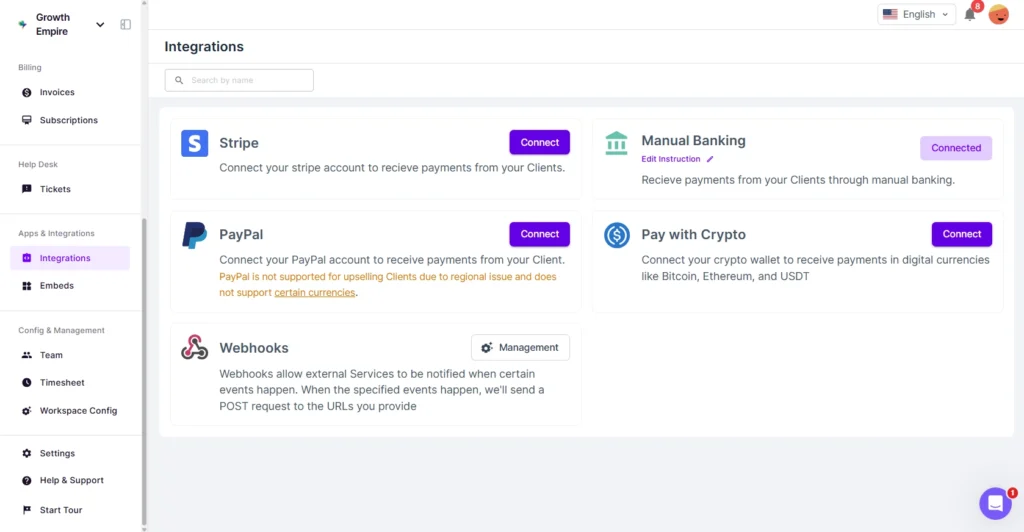
It gives you more payment options than 17hats with no additional costs. Besides, automated reminders keep cash flow steady.
Most importantly, Agency Handy grows with you by offering different pricing plans. Unlike 17hats that stick with one plan, it gives you 3 options, starting Freelancer at $19/month, Team Starter $99/month, and Business Pro $199.

With file feedback tools, embed support, and role-based access controls, Agency Handy gives you a more adaptable toolkit. Ultimately, it’s a stronger choice for agencies ready to move beyond 17hats’ limits.
2. Dubsado vs 17hats
Running a small business is easier when your admin work runs itself. Dubsado helps you simplify client onboarding, automate tasks, and keep every project moving. It’s a flexible alternative to 17hats for service-based teams.
With Dubsado, you can create branded proposals, contracts, and invoices that clients can sign and pay in minutes. Also, smart fields and reusable templates cut your repetitive work. At the same time, automated workflows handle follow-ups, status updates, and scheduling.
Additionally, its client portals provide customers with 24/7 access to forms, contracts, and project updates.
Compared to 17hats, Dubsado offers deeper form customization and conditional logic. Plus, with Dubsado, you get two plans, Starter at $20 and Premier at $40 so that you only use what’s necessary for your workflow.
3. HoneyBook vs 17hats
If you want every client interaction to feel smooth from start to finish, HoneyBook makes it happen. It consolidates proposals, contracts, invoicing, scheduling, and automation into one platform for small, service-focused businesses.
You can send branded proposals that roll contracts and payment requests into a single step. Plus, its invoicing handles deposits, installments, recurring payments, and even instant deposits.
HoneyBook offers three clear plans to match your needs. Starter is $36/month, Essentials is $59/month, and Premium is $129/month. By comparison, 17hats provides similar features but at a different overall price.
If you weigh 17hats vs Honeybook, 17hats excels in deep customization and workflow automation, HoneyBook leans into client experience. Again, with its visually rich proposals and straightforward client portal, HoneyBook makes onboarding fast and polished.
Final Thoughts
17hats gives you invoicing, scheduling, contracts, CRM, and workflows under one roof. It works well if you’re a freelancer, consultant, or event planner who values automation.
But some gaps remain, like paid add-ons, limited payment options, and no built-in ticketing slow you down. Hence, Agency Handy steps in with all the bells and whistles you’d need.
So, if you’re ready for a setup that runs client work and support in one space, Agency Handy is worth a closer look.
FAQs
What are 17hats used for?
17hats is used for managing clients, projects, and business operations in one platform. It combines CRM, invoicing, scheduling, contracts, and automation to help freelancers and small teams stay organized and save time.
How much does 17hats cost?
17hats costs $60 per month, $600 per year, or $800 every two years. All plans include CRM, invoicing, scheduling, and a 7-day free trial.
What size business is 17hats best for?
17hats is best for freelancers, coaches, event planners, and small service businesses that need an all-in-one tool for client management and admin tasks.
How customizable is 17hats?
17hats can be customized with your brand colors, logo, fonts, custom fields, templates, and workflows. It also allows personalized forms and client portals.
How to create a workflow in 17hats?
To create a workflow in 17hats, add actions like sending contracts, emails, or questionnaires, set time delays, and insert tokens for personalization. You can mix automated and manual steps to ensure each client gets a consistent, professional experience without extra effort.
Is 17 hats a CRM?
Yes, 17hats is a CRM that captures leads, stores contact details, tracks projects, and automates follow-ups to manage client relationships in one place.
Is 17hats easy to use?
Yes, 17hats is easy to use, in fact, you can set it up in a few steps. Email and bank setup may take patience, but once done, it handles tasks, organizes projects, and speeds up client work
Is 17hats secure?
Yes, 17hats is secure as it uses Stripe for payments and password-protected client portals. Plus, you control what documents your clients can see. However, file uploads still need an external link for sharing.
Is 17hats good for invoicing?
Yes, 17hats is good for invoicing. You can create branded invoices, add tax, discounts, tipping, and recurring billing. Payments run through Stripe, but advanced tax setup for multiple regions is missing.