Skip to content




Most reminder emails fail for one reason. They sound like an accusation.
A gentle reminder email is a short, polite follow-up that names the task, the date, and one clear ask. Every template here runs under 90 words, so you can send one in the same thread within a minute.
You’ve probably sent one that went unanswered. Most people aren’t dodging you. Your message sank under everything else in their inbox.
Pick the template that fits, swap the brackets, and send it. Each works as a kind reminder or a kindly worded nudge for a boss, a client, or someone who owes you money.
Key Takeaways
- A gentle reminder email works best under 90 words, with the task, the date and one clear ask. All 21 templates here follow that rule.
- Wait at least 24 hours before a reminder, and stop at two or three before you switch channels, per Grammarly. Our rule of thumb is 2 to 3 days before the first nudge.
- Silence rarely means no. In a 2025 study of 7,530,489 cold sales emails, 58.6% of replies came after the first email (Belkins).
What is a Gentle Reminder Email?
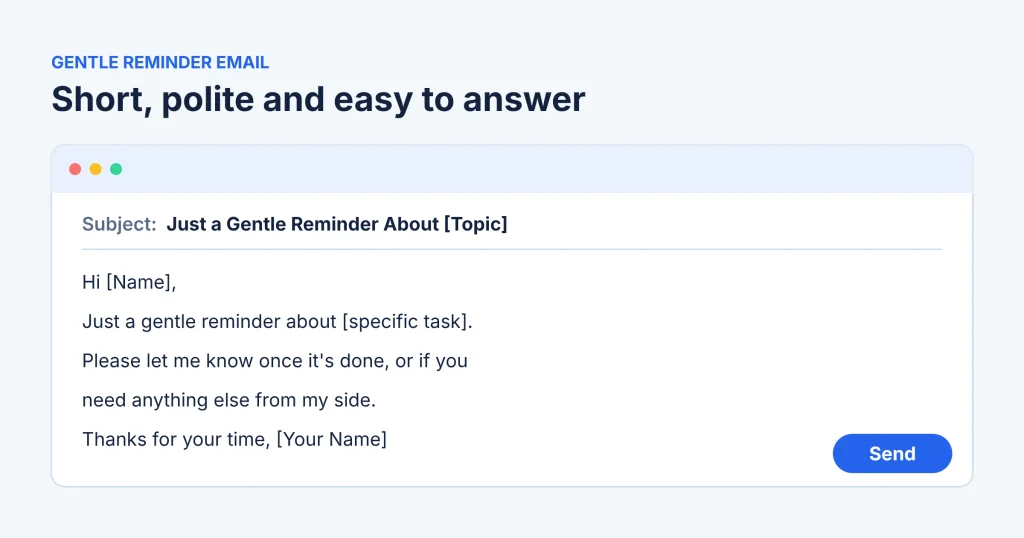
A gentle reminder email is a polite nudge about something the reader already knows about: a reply, a payment, or a sign-off.
It names the task and the date, makes one ask, and leaves the reader an easy way out. It sits between a first request and a formal chase.
“Gentle” describes tone, not timing. You can send one the day before a deadline or two weeks after silence. People also call it a kind reminder, a friendly reminder, or a soft reminder.
21 Gentle Reminder Email Examples to Copy
These polite reminder email samples cover bosses, colleagues, clients, and payments. Pick the one that fits and swap the brackets. Each works as a gentle reminder email sample, a friendly reminder email example, or a short reminder message, and none runs past 90 words.
1. Short Gentle Reminder Email Example (Quick Follow-Up)
A brief reminder can keep projects on track without creating extra work. Use this simple template to follow up efficiently and respectfully.
Template –
| Subject: Just a Gentle Reminder About [Topic] Hi [Name], Just a gentle reminder about [specific task, meeting, or email]. Please let me know once it’s done or if you need anything else from my side. Thanks for your time and attention. Best, [Your Name] |
Why this works: It names the task, asks for one action, and closes the loop, so the reader knows exactly what to do.
2. Gentle Reminder Email Example to Colleagues (Polite Internal Follow-Up)
When it comes to an official gentle reminder email example to connect with your colleagues, this one works pretty well.
Template –
| Subject: Reminder: [Project/Task] Update Needed Hi [Colleague’s Name], I’m checking in on the status of [Project/Task Name]. We’re getting close to the deadline, and I wanted to make sure you have everything you need. Let me know if I can help. Kind regards, [Your Name] |
Why this works: Offering help in the last line turns a check-in into support, which keeps the note friendly between peers.
3. Gentle Reminder Email Example to Boss (Professional and Respectful)
Use this concise email to follow up respectfully and move a project forward.
Template –
| Subject: Follow-Up on [Topic or Request] Dear [Boss’s Name], I hope you’re doing well. I just wanted to follow up on my previous message regarding [specific topic]. I understand you’re busy, but I’d appreciate your input when you have a moment. Thank you for your time and guidance. Best regards, [Your Name] |
Why this works: It acknowledges their workload before the ask, and “when you have a moment” leaves them in control.
4. Gentle Reminder Email Example for Approval (Polite and Direct)
When you’re waiting on a sign-off to keep things moving, a respectful reminder can get you approval. Here’s a version that says exactly what’s needed.
Template –
| Subject: Approval Needed for [Project/Document Name] Hi [Name], Just a quick reminder — I’m awaiting your approval on [specific document or project]. Your confirmation will help us move forward as planned. Please let me know if you’d like me to make any adjustments. Thanks for your attention! Best, [Your Name] |
Why this works: It ties the request to a shared plan, so the approval feels like progress, not a favor.
5. Gentle Reminder Email Example for Meeting (Timely and Polite)
Meeting invites get buried fast. A short reminder with the link and a way to reschedule helps people show up, or tell you early that they can’t.
Template –
| Subject: Reminder: Meeting Scheduled on [Date/Time] Hi [Name], Quick note that our meeting is scheduled for [Day] at [Time]. Here’s the link to join: [Meeting Link]. Please let me know if you need to reschedule. Looking forward to catching up! Best, [Your Name] |
Why this works: The join link and the reschedule offer remove the two most common reasons for a no-show.
6. Gentle Reminder Email Example for an Event or Appointment
Give the time, the place or link, and a deadline for changes. This way, people know exactly what to do if the plan shifts.
Template –
| Subject: Reminder: [Event] on [Date] at [Time] Hi [Name], A quick reminder that [Event] is on [Date] at [Time], at [Location or Link]. If you can’t make it, tell me by [Date], and I’ll reschedule. See you there, [Your Name] |
Why this works: A change-by date gives people a clear cutoff for speaking up, so you can plan early.
7. Gentle Reminder Email Example for Due Payment (Polite but Clear)
A payment reminder works when it names the invoice, the due date, and a way to pay. Keep the tone neutral, because the client may simply have missed it. If you’re still choosing how to send invoices, this invoicing software roundup compares seven options.
Template –
| Subject: Payment Reminder for Invoice #[Number] Hi [Client’s Name], I hope all’s well. This is a gentle reminder regarding the payment for Invoice #[Number], due on [Date]. If payment has already been made, please disregard this email. Otherwise, you can complete it via [Payment Link]. Appreciate your prompt attention! Best, [Your Name] |
Why this works: It names the invoice, the date and a pay link, and the exit line stops a missed email from reading as blame.
8. Overdue Payment Gentle Reminder Email Example (Firm but Polite)
Once the due date has passed, stay calm and be specific. Name the amount, give the link, and invite a reply if something is holding the payment up. If the invoice stays unpaid, see what to do when a client is not paying an invoice.
Template –
| Subject: Invoice #[Number] Is Now [X] Days Overdue Hi [Client’s Name], I’m following up on Invoice #[Number] for [Amount], which was due on [Date]. I haven’t seen the payment yet. You can pay here: [Payment Link]. If something is holding it up, tell me, and we’ll sort it out together. If you’ve already paid, thank you, and please ignore this note. Best, [Your Name] |
Why this works: Stating the amount and the due date keeps it factual. The invitation to flag a problem keeps the client talking.
9. Gentle Reminder Email Example for Contract Renewal
Contracts don’t end conversations; rather, they extend them. A kind reminder about a renewal can keep the relationship strong without sounding like a sales pitch. Here’s a template that does just that.
Template –
| Subject: Reminder: Contract Renewal for [Client/Service] Hi [Client Name], Just a quick note to remind you that our contract for [Service/Project Name] is set to expire on [Date]. We’d love to continue working together. Please review the renewal terms attached and let me know your thoughts. Thanks for your continued trust! Warm regards, [Your Name] |
Why this works: The expiry date creates a natural deadline without a sales pitch, and the attached terms save a round trip.
10. Gentle Reminder Email Example for Proposal Follow-Up
Proposals sit unread when the client has no date to act by. Name the day you sent it, offer to talk it through, and ask for a yes, a no, or a “not yet”.
Template –
| Subject: Following Up on the [Project] Proposal Hi [Client’s Name], I wanted to check whether you’ve had a chance to review the proposal I sent on [Date]. If anything is unclear, or you’d like to adjust the scope or budget, I’m happy to jump on a quick call. Could you let me know by [Date] if you’d like to move forward? A short yes, no or “not yet” helps me plan. Best, [Your Name] |
Why this works: A yes, a no or a “not yet” is easy to give, and any of the three tells you your next step.
11. Gentle Reminder Email Example for Project Updates
A quick check-in often makes the difference between smooth progress and missed deadlines. Here’s a fresh, friendly way to follow up and offer help.
Template –
| Subject: Checking In on [Project Name] Hey [Name], Just wanted to touch base on [Project Name]. Are we on track for the [Milestone/Deadline]? Let me know if there’s any support you need from my end. Thanks a lot, [Your Name] |
Why this works: Asking about one milestone is easier to answer than asking for a general update.
12. Gentle Reminder Email Example for Missing Client Assets or Forms
Agencies lose days waiting on logos, logins, and onboarding forms. Name what you need, why it matters, and where to send it. Onboarding a new client? The welcome message gets easier with a client onboarding email template.
Template –
| Subject: Still Need [Assets/Form] for [Project] Hi [Client’s Name], To start [Project] on [Date], we’re waiting on [logo files / login access / the onboarding form]. You can upload them here: [Link]. If anything is unclear, reply and I’ll walk you through it. Thanks for your help, [Your Name] |
Why this works: Naming the start date shows the delay has a cost, and the upload link removes the work of replying.
13. Gentle Reminder Email Example for Feedback or Review
If someone hasn’t shared feedback yet, a quick nudge is usually enough. Keep it short, say how long it takes and link straight to the form.
| Subject: Quick Reminder: We’d Love Your Feedback! Hi [Name], Hope you’re enjoying [Product/Service]. This is a gentle reminder to share your feedback. It only takes a minute! Your input helps us improve and serve you better. Leave your review here: [Link] Thank you so much, [Your Name] |
Why this works: Saying it takes a minute lowers the effort, and the direct link means one click starts it.
14. Gentle Reminder Email Example for Deadline or Submission
Sometimes deadlines get buried. A quick reminder can help you keep things moving without sounding like you’re pressuring someone. Here’s a version you can copy and send right away.
| Subject: Reminder: [Task/Report Name] Due Soon Hi [Name], Just a quick reminder that [Task/Report] is due on [Date]. Please let me know if you foresee any delay or need assistance. Appreciate your cooperation! Warm regards, [Your Name] |
Why this works: Asking about delays now invites early news, while there is still time to adjust.
15. Gentle Reminder Email Example After No Response
Even when someone doesn’t respond, it doesn’t mean they’re ignoring you. They might just be caught up. This template helps you follow up with empathy and clarity.
| Subject: Following Up on My Last Email Hi [Name], I wanted to quickly follow up on my email from [Date] regarding [Topic]. I know you’re busy, but I’d appreciate it if you could take a look and share your feedback when possible. Thank you so much for your time. Best, [Your Name] |
Why this works: Granting that they are busy lowers defensiveness, and the date points them straight to your original message.
16. Second Gentle Reminder Email After No Response
Send this about a week after the first reminder. Ask for a yes, a no or a new date, so a one-line answer is enough.
| Subject: Following Up Again on [Topic] Hi [Name], I’m writing again about [Topic], since I haven’t heard back. I know things get busy. Could you reply with a yes, a no, or a new date by [Date]? A one-line answer is enough. If this is no longer a priority, let me know, and I’ll close it on my side. Best, [Your Name] |
Why this works: Offering to close the loop gives them permission to say no, which often prompts the reply a vague nudge doesn’t.
17. Gentle Reminder Email on the Below Request
Use this when your request sits further down the thread, and the reader may have skipped it. Point to it, restate the ask, and offer help.
| Subject: Following Up on the Request Below Hi [Name], A kind reminder about the request below. We still need [item] by [Date] to keep [Project] on schedule. Could you send it over, or tell me what’s blocking it? I’m glad to help. Thanks, [Your Name] |
Why this works: Pointing to the earlier message saves them a search, and asking what is blocking it surfaces the real issue.
Other ways to open it: “A kind reminder on the below email”, “Just a gentle reminder on the below request” or “A kind reminder regarding the email below”.
18. Final Gentle Reminder Email Example (Before Escalation)
If you’ve followed up more than once and still haven’t heard back, it’s time for one last, respectful nudge. Here’s how to stay polite while signaling it’s the final ask.
| Subject: Final Reminder: [Topic/Task] Dear [Name], This is a gentle reminder regarding [Topic]. We’ve sent a few follow-ups earlier and would appreciate your response to close this loop. Please confirm once this is completed. Thank you for your attention. Sincerely, [Your Name] |
Why this works: Calling it a final follow-up signals the next step without a threat, and you ask for one confirmation only.
19. Urgent Gentle Reminder Email Example (Time-Sensitive Request)
Use this when a deadline is close and a normal nudge is too slow. Put the real date in the subject line and say why it matters. The word “urgent” adds pressure without adding information.
| Subject: Quick Reminder: [Task] Needed by [Date and Time] Hi [Name], I’m following up on [Task] because the deadline is [Date and Time]. We need it by then to [reason, such as send the files to the printer]. If you’re tied up, tell me what is left and I’ll help. Thanks for making time for this. Best, [Your Name] |
Why this works: A real date and a real reason explain the rush without sounding alarmed, and the offer to help keeps it collaborative.
20. No-Show Gentle Reminder Email Example (After a Missed Meeting)
People miss meetings for ordinary reasons. Skip the blame, say you missed them and offer two new times. That makes saying yes easy.
| Subject: Sorry We Missed Each Other Today Hi [Name], We had a call booked for [Date and Time], and I didn’t see you join. I hope everything is okay. Would [Option 1] or [Option 2] work to reschedule? You can also pick a time here: [Booking Link]. If this is no longer a priority, let me know and I’ll close it on my side. Best, [Your Name] |
Why this works: Opening with concern, not blame, keeps the door open. Two time options and a booking link make rebooking a one-line reply.
21. Zoom or Video Call Gentle Reminder Email Example
Video calls fail on small details: the wrong link, the wrong time zone or a missing passcode. Put all three in the reminder and send it the day before.
| Subject: Reminder: [Meeting] on [Day] at [Time] ([Time Zone]) Hi [Name], A quick reminder that we’re meeting on Zoom on [Day] at [Time] [Time Zone]. Join here: [Meeting Link] (Meeting ID: [ID], Passcode: [Passcode]). We’ll cover [Agenda Item 1] and [Agenda Item 2]. If you need to reschedule, reply and I’ll send new times. See you there, [Your Name] |
Why this works: The time zone, the link and the agenda sit in one place, so nobody has to dig through old invites.
Payment Reminder Email Sequence: What to Send and When
A payment reminder sequence is five short emails: one before the due date, one on it, then one at 5, 15 and 30 days overdue. The tone firms up at each step, while the wording stays calm.
Late invoices are common. Intuit QuickBooks’ 2026 late payments report found that 59% of US small businesses have invoices overdue by 30 days or more. That is up from 47% the year before. The figure covers small businesses in general, not agencies alone.
So plan the chase before you need it. This is our suggested schedule, so adjust it to your payment terms.
| Stage | When | Tone | Template |
| Before the due date | 3 to 5 days before | Helpful heads-up | Template 22 below |
| Due date | On the day | Neutral and clear | Template 7 |
| 5 days overdue | 5 days after | Calm and specific | Template 8 |
| 15 days overdue | 15 days after | Firmer, asks for a date | Template 23 below |
| 30 days overdue | 30 days after | Final notice, offers a plan | Template 24 below |
Before the Due Date: Heads-Up Template
A reminder before the deadline gets paid on time. It also catches wrong billing details while there is still time to fix them.
Subject: Invoice #[Number] Is Due on [Date]
Hi [Client’s Name],
A quick heads-up that Invoice #[Number] for [Amount] is due on [Date].
You can pay online here: [Payment Link]. If you need a PO number or different billing details, tell me and I’ll update the invoice.
Thanks for working with us, [Your Name]
Why this works: It arrives while paying is still on time, so there is nothing to defend. Offering to fix billing details removes a common blocker.
15 Days Overdue: Ask for a Payment Date
By now two things matter: a date and a reason. Ask for the first and invite the second.
Subject: Invoice #[Number] Is 15 Days Overdue
Hi [Client’s Name],
Invoice #[Number] for [Amount] was due on [Date] and is now 15 days overdue. I’ve written before and haven’t heard back.
Please pay here: [Payment Link], or reply with the date you expect to send it. If there’s a problem with the invoice, tell me and I’ll fix it.
Thank you, [Your Name]
Why this works: Asking for a payment date gives the client an easy commitment, and the offer to fix the invoice covers genuine errors.
30 Days Overdue: Final Notice Template
This is the last email before a call or a formal step. State the deadline and the consequence once, then offer a way to settle it. Check your contract before you add the pause line.
Subject: Final Notice: Invoice #[Number] Is 30 Days Overdue
Dear [Client’s Name],
Invoice #[Number] for [Amount], due on [Date], is now 30 days overdue. Please pay by [Date] using [Payment Link], or call me to agree on a payment plan.
If we don’t hear from you by then, we’ll pause work on [Project], as our agreement allows.
I’d much prefer to sort this out together.
Sincerely, [Your Name]
Why this works: A deadline, a payment plan option and a stated consequence are firm, yet the closing line keeps the relationship intact.
Stop the sequence the day the client pays or replies. If the 30-day email goes unanswered, pick up the phone.
How Long Should You Wait Before Sending a Gentle Reminder Email?
Wait 2 to 3 days after your first message, then send one reminder in the same thread. That’s our rule of thumb. It sits inside Grammarly’s guidance of waiting at least 24 hours.
Silence rarely means no. Belkins studied 7,530,489 cold sales emails sent in 2025 and found that 58.6% of replies came after the first email. Cold outreach isn’t the same as chasing a colleague, but the lesson carries: a reminder often gets the answer.
Timing evidence depends on context. BuzzStream analyzed 65,000+ outreach campaigns and found follow-ups sent after one day earned the best reply rates. Those were cold pitches, so for a client who already knows you, Grammarly’s 24-hour minimum is the safer floor.
Guides often name Tuesday to Thursday mornings as the best time to send. None of the pages we read back that with data. Treat it as a habit, not a rule.
How Many Reminders Should You Send?
Two reminders are the limit for most requests. A third email starts to read as pressure. A simple schedule keeps you polite:
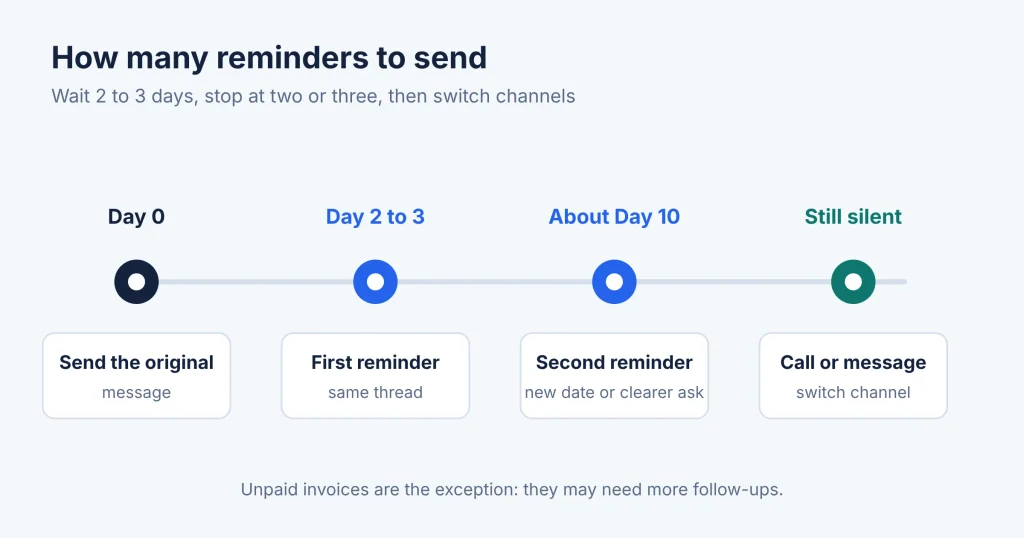
- First reminder: 2 to 3 days after the original message.
- Second reminder: about a week later, with a new date or a clearer ask.
- Final reminder: only if the issue is time-sensitive. After that, call or message them.
Unpaid invoices are the exception. Grammarly notes that payment reminders may need more follow-ups, so keep the tone calm and switch channels if emails go unanswered.
When Not to Send a Gentle Reminder
Don’t send one within 24 hours of your first message. Grammarly calls that the minimum wait, and longer is better for non-urgent requests or people you don’t know well. A close colleague with a same-day deadline might get a nudge after a few hours. A new client’s proposal usually deserves three to five business days.
Skip the reminder once they have replied, even with a short “I’ll get to it Friday”. Put the date in your calendar instead.
How to Write and Send a Gentle Reminder Email
Writing a gentle reminder email takes five steps, from a calm subject line to an easy way out. Send it as a reply in the same thread, so your original message sits right below it. Each step includes lines you can borrow. For other client messages, these client communication templates cover introductions, updates, and invoices.
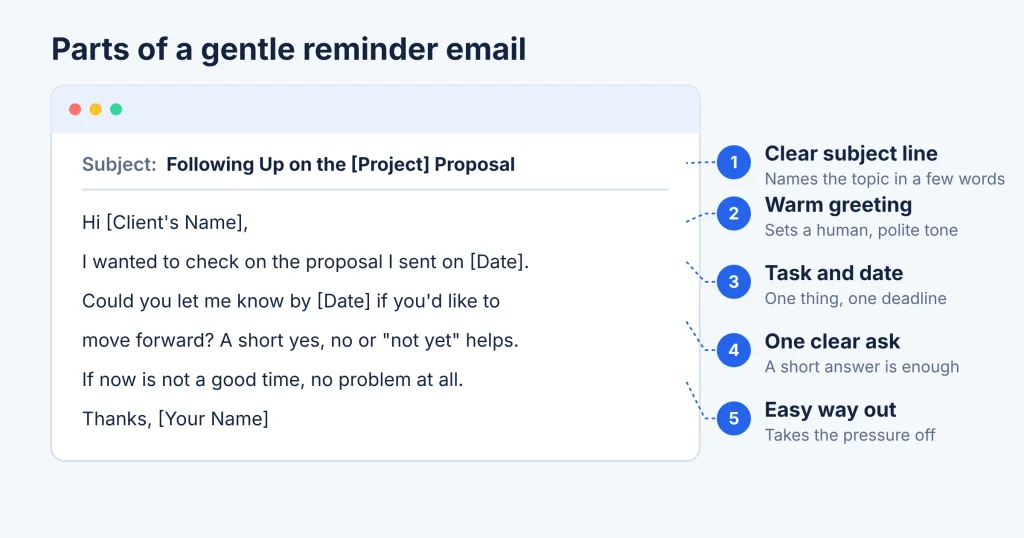
Step 1: Keep the Subject Line Clear and Courteous
You have only a few words to set the tone, so make them count. A good subject line says “this won’t take long” and names the purpose. Try one of these:
- Gentle Reminder: Feedback Needed by Friday
- Following Up on Budget Draft
- Touching Base on Next Steps
- Reminder: Invoice #[Number] Due [Date]
- Checking In on [Project] Approval
Avoid anything dramatic or shouty, like “URGENT!!!” or “PLEASE RESPOND.” That only builds friction.
Step 2: Start With a Human Touch
Before the task, take a second to be human. Acknowledge their world, even a little, and you lower the pressure at once. Try phrases like:
- “Hope your week’s going well.”
- “Just checking in in case this got buried.”
- “I know your inbox is probably full, so I’ll keep this quick.”
These openers show you’re considerate and want to reconnect.
Step 3: Remind Without Pointing Fingers
Nobody likes being called out. Open with “Still waiting on a reply” and you trigger defensiveness, which slows everything down. Take the edge off with phrasing like:
- “Just wanted to follow up on my note from earlier.”
- “Looping back here in case this flew under the radar.”
- “Quick ping to see if you had a chance to look at this.”
It keeps your tone easygoing, like a teammate checking in, not someone keeping score.
Step 4: Get to the Point, Gently
Say exactly what you’re following up on. Don’t make the reader scroll through your last message or connect the dots.
For example: “Just a heads-up that we need your go-ahead on the contract by Friday, so we can stay on track for next week’s kickoff.”
That helps them decide fast.
Step 5: Wrap It With Warmth (and an Easy Out)
End on a kind note, sign-off included. Try:
- “Appreciate you taking the time.”
- “Thanks in advance. Looking forward to your thoughts.”
- “No rush if you’re tied up. Just wanted to keep it on your radar.”
A closing like this invites a reply without pressure. It’s confident, but kind.
Pro Tips for Tonality in Gentle Reminder Emails
Tone decides whether a reminder lands as gentle or rough. The words below build connection, and the ones after them quietly kill it.
Words to Use
Use phrases that show respect for the reader’s time and keep the door open for a reply:
- “Just checking in”: Soft and non-intrusive. It signals curiosity, not impatience.
- “I know you’re busy, but…”: Shows empathy before you make your request.
- “When you get a chance”: Adds breathing room. It tells the reader you understand their workload.
- “I would appreciate if you could…”: Polite, action-oriented phrasing that asks respectfully.
- “Hope this is on your radar”: A gentle way to check that the task hasn’t been forgotten.
- “Appreciate your time”: Ends the note with gratitude and builds goodwill.
- “Just a gentle reminder, [reason]”: Works when you add the reason and an easy out. After a long silence, it can read as a nudge with an edge on its own.
Words to Avoid
Some words change how a message lands, even when your intention is harmless:
- “Urgent”: Adds tension unless it truly is. It can sound like an alarm instead of an update.
- “As per my last email”: Often comes across as condescending. It reads as “you obviously didn’t read my last email.”
- “You must”: Feels authoritarian. It shuts down dialogue and invites resistance.
- “Just a friendly reminder”: Despite the wording, many people read it as passive-aggressive, as if you’re annoyed.
- “Still waiting”: Signals impatience and frustration.
- “As I said before”: Comes off defensive or irritated, especially in writing, where tone is easy to misread.
- “You should have”: Sounds accusatory and critical.
How to Remind Someone Politely to Reply to Your Email
Reply in the same thread, restate your ask in one line and give the reader an easy way out. That keeps the original message right below your note, so nobody has to dig for context.
A gentle follow-up email needs no apology. Skip “sorry to bother you.” You aren’t bothering anyone, and the apology makes the ask sound bigger than it is.
Then name a date or a choice, like “Could you send a yes, a no or a new date by Friday?” A one-line answer is enough. Use template 15 for the first nudge and template 16 about a week later.
Email vs LinkedIn vs SMS: Where Should You Send a Reminder?
Start with email, move to LinkedIn when email goes quiet and use SMS only for same-day needs. The channel changes what counts as polite.
| Channel | Best for | Keep it | Avoid |
| First and second reminders, invoices, anything with a link | Under 90 words, in the same thread | Long threads with several asks | |
| People who ignore email, prospects, contacts you met through work | Two or three sentences | Pasting a full email | |
| SMS | Same-day deadlines, appointments, clients who already text you | One sentence and a link | Texting people who haven’t agreed to texts |
After two or three unanswered emails, switch channel instead of sending a fourth. A different channel reaches people who skip their inbox, and it shows you aren’t just repeating yourself.
LinkedIn Reminder Message Example
Hi [Name], I sent you an email on [Date] about [Topic] and wanted to make sure it reached you.
Could you reply here or by email by [Date]? Thanks!
SMS Reminder Message Example
Hi [Name], it’s [Your Name] from [Company]. Quick reminder that [Task] is due [Date]. Here’s the link: [Link]. Thanks!
Keep texts to business hours, and message only people who already text you or have agreed to it.
Common Mistakes That Make a Reminder Sound Pushy
Five habits make a reminder sound pushy, and each has a quick fix:
- Sending too soon: A reminder within 24 hours of your first message reads as impatience. Wait 2 to 3 days.
- Piling on reminders: After two or three emails, switch to a call or a message.
- Staying vague: Name the task, the date, and the one thing you need.
- Sounding annoyed: Phrases like “as per my last email” put the reader on the defensive.
- Burying the ask: One email, one request. Several asks make it easy to answer none.
Here is how to reword the worst offenders:
| Instead of | Try |
|---|---|
| As per my last email | Looping back on my note from Tuesday |
| Still waiting on this | Checking in on this when you have a moment |
| You must reply by Friday | Could you reply by Friday? A short answer is enough |
| Urgent: respond now | Quick reminder: [Task] is due [Date] |
Why Gentle Reminder Emails Actually Work
A gentle reminder keeps things moving while staying respectful and professional. Here’s why it works.
1. People Forget
Most people don’t skip replies on purpose. Their inboxes are flooded, and priorities shift fast. A simple reminder brings their attention back without embarrassment.
That’s why HR officers, account managers, and project leads often use polite persistence to get faster results than blunt follow-ups ever could.
2. Your Tone Shapes the Relationship
The way you phrase a reminder can strengthen or strain a relationship. Phrases like “just checking in” or “hope you’re doing well” come across as considerate and soften your request.
If you work in sales, customer success or client management, this balance matters. It keeps communication open even when the topic is sensitive, like delayed payments or approvals.
3. Build Trust and Reliability
Consistent, polite follow-ups make people see you as organized and dependable. Picture a designer checking in about a project, or a developer following up on a deliverable. That calm consistency tells others you take your work and their time seriously.
4. They Keep the Workflow from Stalling
Every project reaches a point where one missing approval or update can slow the whole process. A gentle reminder breaks the deadlock.
A quick note like “Hey, just checking if you had a chance to review the draft” reopens the conversation and keeps progress visible.
5. Politeness Works on a Psychological Level
Polite reminders tap into reciprocity. When you’re kind and respectful, people naturally want to respond the same way. A thoughtful tone turns your message from a demand into cooperation.
Wrapping Up
A reminder email feels like a risk until you send one. Most people aren’t ignoring you. They’re busy, and your message sank under a pile of newer emails. A short note that names the task, gives a date, and offers an easy way out is all they need to act.
This week, find the one request still waiting on a reply, pick the matching gentle reminder email above and send it in the same thread. Then put the second reminder in your calendar for a week out, and switch to a call if the silence continues.
FAQs
1. Is it okay to say “gentle reminder” in an email?
Yes. It’s polite and widely used, though some readers hear it as passive-aggressive, especially after a long silence. Add a reason and an easy out, like “no rush if you’re tied up”, and a gentle reminder lands as a nudge, not a nag.
2. What can I say instead of “gentle reminder”?
Try “just checking in”, “circling back”, “wanted to keep this on your radar” or “a quick note on [topic]”. Match the phrase to the person. “Circling back” suits colleagues, while “a quick note” works for clients and anyone you don’t know well.
3. Is it “kind reminder” or “kindly reminder”?
“Kind reminder” is the standard form. “Kindly” is an adverb and “reminder” is a noun, so “kind” is the correct word, even though “kindly reminder” is common in everyday email. Use “kindly” with a verb instead: “Kindly reply by Friday.”
4. How many gentle reminder emails should you send?
Send one gentle reminder email after 2 to 3 days and a second about a week later. Stop at two or three in total, as Grammarly advises, then call or message the person. Use a third email only when the issue is time-sensitive, such as a deadline or an unpaid invoice.
5. How do I remind someone politely to reply to an email?
Reply in the same thread so they see the original message, restate your ask in one line, and give an easy out. Our After No Response and Second Gentle Reminder templates follow that shape. Name a date if you need an answer by then.
6. How can I follow up on a payment without sounding rude?
State the invoice number, the amount, and the due date, then add a payment link. Reassure them with “if it’s already handled, feel free to ignore this note”. Keep the tone neutral and end with a thank you. The overdue template adds a way to flag a problem.
7. How long should you wait before sending a gentle reminder email?
Wait at least 24 hours, and 2 to 3 days for most requests. Grammarly suggests 3 to 5 business days after a new client proposal. Payment reminders can wait longer, depending on your terms. Sending sooner can read as impatience.
8. How do I write a gentle reminder email to a client?
Keep your gentle reminder email short and specific. Open with a warm line, name the deliverable or invoice, add the date, and say what you need. Close with thanks and an easy out. Our client templates for approvals, missing assets, and payments are ready to copy.
9. How do you say “gentle reminder” professionally?
Try “just checking in”, “circling back” or “a quick note on [topic]” instead. For a formal tone, write “I wanted to follow up on [topic]” or “I’d appreciate an update on [topic]”. Match the phrase to the person: “circling back” suits colleagues, while “a quick note” works for clients.
Sources: Belkins sales follow-up statistics, Grammarly reminder email guide, BuzzStream follow-up email study, Intuit QuickBooks late payments report. Check each vendor page for current figures.