Skip to content
  Get the best 3-year deal NOW →



Invoicing clients isn’t just about asking for payment from clients. A clear, professional invoice shows you’re organized. It sends a strong impression about how seriously you take your work. And of course, it reduces friction for clients to pay on time.
Invoices often miss essential elements like invoice dates, due dates, wrongly formatted itemized services, taxes, and clear payment terms. Clients get confused, and it causes unwanted delays.
This article isn’t a guide on how to make an invoice. It’s about how you should invoice clients. What you must include to keep it professional, and how to deal when it’s overdue.
What is Client Invoicing?
Client invoicing is a formal document to request payment for provided products or rendered services to clients. An invoice includes details such as the total billed amount, due date, product or service details with quantities, payment terms, taxes or fees, business information, and client information.
When you invoice clients, it serves several key purposes, including –
- First and foremost, the service provider wants to get paid
- Clients get a clear document showing how much they have to pay, the due date, and the payment methods
- Reminds clients to pay for services
- Keeps transactions in check for tracking revenue and taxes
This legal financial record is for both clients and the service provider or product manufacturer. Businesses and freelancers can track their revenue and cash flow. Invoicing is a must to stay compliant with tax regulations.
What are the Elements of Client Invoice?
Elements for service and product invoices slightly differ. Also, during the project, the terms and conditions you agreed with your clients also slightly changed elements. But typically, the following are the key elements for invoicing –
1. Invoice number: A unique sequential number to identify the invoice. Each organization has them to easily track and manage accounting stuff. (e.g., INV-2026-001)
2. Issue date: This is the date of issuing the invoice.
3. Due date: The payment should be made by the deadline. It’s determined by the agreed-upon payment terms.
4. Client information: This includes your clients –
- Name or company name
- Billing address
- Contact information (mobile and email)
5. Business information: This includes your –
- Business name
- Address
- Contact number, email, and website
- Tax ID (if applicable)
6. Description of products or services: This section should clearly show what you’re charging for. Projects or deliverables should be agreed upon before and backed by the agreement. For each billable item, include:
- Description
- Quantity of hours worked
- Rate or price per unit
- Line total
7. Subtotal and taxes: This would be a breakdown of charges before and after taxes –
- Subtotal: Before taxes or discounts
- Taxes: Include applicable VAT, GST, or sales tax
- Discounts: Any applied discount (percentage or flat)
8. Total due amount: The final amount in bold that the client must pay.
9. Payment terms and methods: Accepted payment methods (Credit card, digital wallets, or bank transfer). Late payment fees if previously agreed upon.
How to Invoice a Client
Each invoice has to go through a series of steps until you finally receive payment. From terms and conditions to invoicing and then getting paid, all are linked to each other. This section will break these down –
Have your payment terms upfront
After you land a client and agree to do a specific project, first you have to clear the payment terms and conditions.
Depending on the type of service you provide, have your terms and conditions written and highlight key terms such as payment rates, time periods, methods, percentage of deposit, due dates, late or due payment fees, and stages of deliverables (if applicable).
Ask for an initial deposit amount
It’s better to request an initial deposit equal to the agreed-upon payment. You can ask the client to deposit between 20% and 50% before you start working. You can also split payments across multiple milestones depending on the project type. Like –
- Deposit 40% of the payment before starting the project
- Pay 30% of the payment when you deliver the first draft
- Rest 30% after you complete the project
Again, this practice will vary depending on the service you provide.
Make the Invoice
You’d better start with a template if you will be creating an invoice for the first time. You can create an invoice using Microsoft Excel, free invoice templates, Microsoft 365, and Google Sheets.
Invoice templates are okay if you only have to send several invoices per month. But if you have more than a dozen clients, automated invoices would be the efficient option.
There are also web and cloud-based invoice creation software that are easier than pre-made templates.
Further Read:
How to Make an Invoice in Excel: Step by Step (With Templates).
Primarily, there are 7 parts in an invoice.
- Company information
- Client information
- Description of services you provide with cost breakdown
- Taxes
- Invoice creation date and due date
- Payment terms and methods
- Personal notes (optional)
The earlier section breaks down these essential invoice elements in detail.
Sending the Invoice
When you’re done doing the assigned project, hand over the deliverable files with an invoice detailing the agreed-upon deliverables. It’s always better to email the invoice to your client for the record.
Within the email, you can leave a personalized text to point out important stuff, or maintain formalities like “…..It was a pleasure working with you.”
Get the Payment
Your invoice should clarify the payment method you wish to use. If it’s a direct bank deposit, send your bank details.
If it’s a digital wallet like PayPal, it will charge a fee and give you the rest. For PayPal, sending to “friends and family” doesn’t charge that much.
If you want it through PayPal, clearly mention that the client must send the payment as a “friends and family” transfer.
Other than PayPal, there are some digital wallets that don’t charge that much every time you bring payment through them.
Further Read:
Payment Integration
Taxes
If you’re growing your freelance career into a business, all your invoices must have taxes mentioned. Tax can be inclusive or exclusive.
Let’s say you charge $1000 for a project. Mention in the tax field whether the tax is included in the payment or it’s exclusive.
Check the local authority website in your area regarding tax details and calculations.
If you want to exclusively take the tax amount from the client, discuss this matter upfront. You can have it in the agreement as well.
When you invoice clients from the Agency Handy platform, you can specifically mention if the taxes are inclusive or exclusive. You can track the records of transactions to identify and calculate the tax amount, and use the tax data to submit your tax file.
How Agency Handy Can Help You Create and Send an Invoice
Agency Handy simplifies client invoicing with information fields for clients, project description, currency, tax rates, payment method, reminders, notes, etc.
- Gets Client Information
The section for client information includes fields like client name, project ID, billing address, contact information, email, etc., essential items.
- Adds One-time and Recurring Project Description
Add your projects one by one with specific pricing. You can invoice clients both for one-time and recurring projects. This is extremely useful, especially if you have to manage subscriptions.
- Calculates Pricing
You can invoice in the most popular currencies. It automatically breaks down the pricing as per the number of projects and rates.
- Adds Tax Rates
Based on your local tax rate, you can set the rate to calculate the subtotal. Agency Handy stores all your tax data based on the transactions for a specific period of time and tax rate.
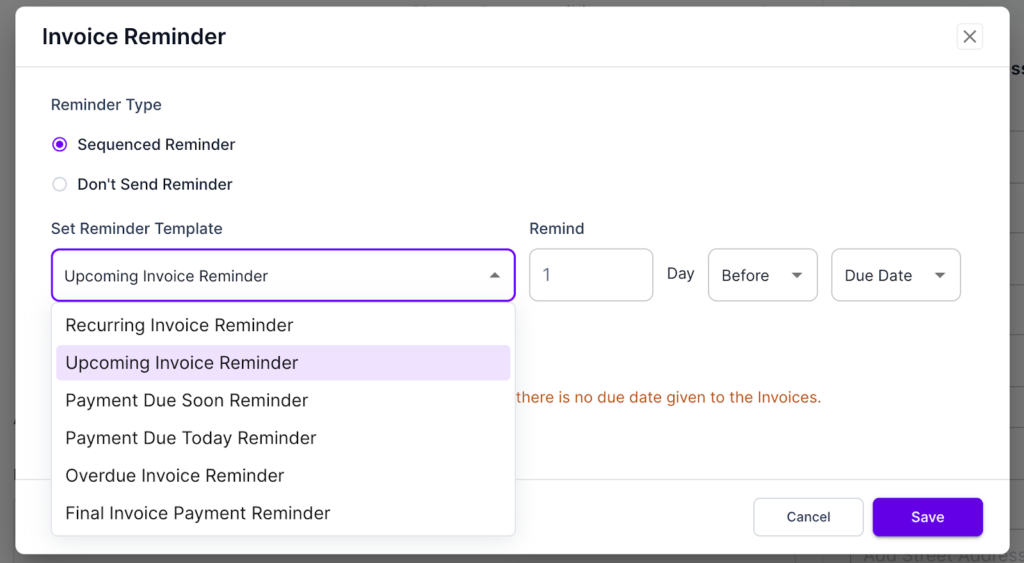
- Sends Client Reminder
You can set reminders to send to clients for a number of occasions. No need to email clients at all. They get automated emails for recurring, one-time, due, and overdue payments.
- Adds Note
For any specific invoice, if you need to leave a personalized note, you can do that with your preferred format and style.
Here’s a full breakdown on how Agency Handy helps you create a client invoice in 6 steps.
Further Read:
Subscription Management Software
Mistakes to Avoid in Client Invoicing
We spotted people making silly mistakes while invoicing clients. Some of the below issues we noticed people doing in our Agency Handy platform.
Missing Information
Invoicing in the early days of your business might make you forget to include the invoice number. Also, check if you mentioned the invoice data and the due date.
Delay Invoicing
Just after you’re done with deliverables, promptly invoice your clients. If you delay, it will delay the payment process overall.
Not Requesting a Deposit Upfront
Beginner freelancers tend to work with clients without taking a deposit amount.
If clients liked your portfolio and any of your previous work, that means you’re not doing it to see if the client likes your work or not. If a client agrees to give you a project, request to deposit anything between 20%-50% of the total payable.
Inconsistency
Throughout the invoice, make no inconsistencies like using different fonts, misaligned texts, not specifying Net 30, using confusing terms, unprofessional invoice layout, etc.
Aggressive Follow Up
If your client forgets to pay the invoice, that’s okay. But when you send an aggressive follow-up to complete the payment, that’s where things get messy. If you do anything unprofessional or inappropriate, he might not continue working with you further.
Unclear Line Items
Carefully add line items with proper descriptions. Breakdown hours, quantity, and rates, whatever is applicable for your project. Line items and breaking down details must align with the subtotal amount.
Common Invoicing and Payment Terms
When you are working with big clients, your invoice should reflect your professionalism using common invoicing and payment terms. The following terms will help you craft better invoices, maintaining professionalism –
Net 15 / Net 30 / Net 60: Payment is due 15, 30, or 60 days after the invoice date.
Due Upon Receipt: Clients have to immediately complete the payment after the invoice is received.
Advance Payment / Upfront Deposit: A portion of 25–50% or the full amount is paid as an advance before work begins.
Partial Payment / Installments: The total amount is split and billed across milestones for long-term or high-budget projects.
End of Month (EOM): Payment is due by the last day of the month in which the invoice is issued for a monthly accounting cycle.
Early Payment Discount: A discount (2%-5%) is offered if payment is made within 10 days.
Late Payment Fee: A penalty (2%-5% monthly) is added when payment is overdue.
When to Send the Invoice to a Client
In general, you can send an invoice to a client promptly after the end of a project. But if the project agreement was made based on milestones including a deposit amount, then you will have to send an invoice –
- In the beginning (requesting the deposit amount)
- After reaching each milestone or project phase
- At the end of the project (requesting to pay the rest of the amount
Whenever you send the invoice, make sure the invoice date and due date are there. Typically, the due date is “Net 30”. Meaning if you send the invoice on 1st January, the due date would be January 30th.
What If the Invoice is Overdue
Your clients need consistent reminders of overdue invoices. When you email regarding the overdue invoice, you have to be gentle yet professional to make things clear and remind him about the project agreement. If you stated any overdue charges, mention them both in the invoice and email.
For overdue invoices, send an email –
- Before the overdue date
- 1-2 weeks after the invoice is overdue
- 30 days after the invoice is overdue
In most cases, the client might forget about the payment. This happens a lot if the person manages multiple areas of his/her business. A gentle reminder does the work well.
But sometimes, you have to push a bit, reminding about the overdue charge. And in worst cases, you will have to take legal actions based on the project agreement.
This article clearly mentions how to request payment from clients when it’s overdue, maintaining proper etiquette and professionalism.
Frequently Asked Questions
What is the difference between billing and invoice?
Billing is the overall process of requesting payment from clients, while an invoice is the actual document that requests a specific payment. Billing includes creating invoices, sending reminders, and collecting payments.
What is the difference between an invoice and a receipt?
An invoice requests payment for goods or services before or when payment is due. While a receipt confirms that payment has already been received.
What’s the difference between a quote and an invoice?
A quote (or estimate) is a proposed price that is given before work begins. This isn’t a payment request. Whereas an invoice is issued after work is completed (or started). It demands an actual payment. Quotes are proposals; whereas invoices are bills.
What are the 3 types of invoices?
The three main types are: (1) Standard invoices for one-time completed work, (2) Recurring invoices for ongoing services billed regularly, and (3) Milestone/progress invoices for large projects paid in phases.
How soon should I send an invoice after completing work?
You should send your invoice within 24-48 hours of project completion. The sooner you send it, the sooner you get paid.
Can I charge late fees on overdue invoices?
Yes, if your late fee policy is stated on the invoice or in your contract before the work begins. The overdue fee typically ranges from 1.5% per month to flat fees of $25-100.
How many payment reminders should I send?
You should send a courtesy reminder 3-5 days before the due date, then follow up at 3 days overdue, 7 days overdue, and 14 days overdue. After 30 days, consider a final notice before escalating to collections or legal action.
Do I need invoice software, or can I use Word/Excel?
You can use Word or Excel for occasional invoicing, but software saves significant time once you’re sending 10+ invoices monthly.
Final Words
For effective client invoicing, you have to make payment as effortless as possible. Also, the right timing is no less important. If you offer multiple payment methods, including cards, bank transfers, and digital wallets, there will be less friction for payment.
Try to send invoices on Tuesday through Thursday mornings. And avoiding sending on Mondays.